



8 min read

What’s New in Microsoft 365 | November Updates | Ignite Highlights

What’s New in Microsoft 365 | November Updates | Ignite Highlights


Microsoft announced quite a few new features and licenses options during their annual Microsoft Ignite 2025 conference in San Francisco. Nick cuts through the noise to bring you a concise summary of all the exciting announcements and updates!

teamslogo2-150x150

Microsoft Teams


New Features


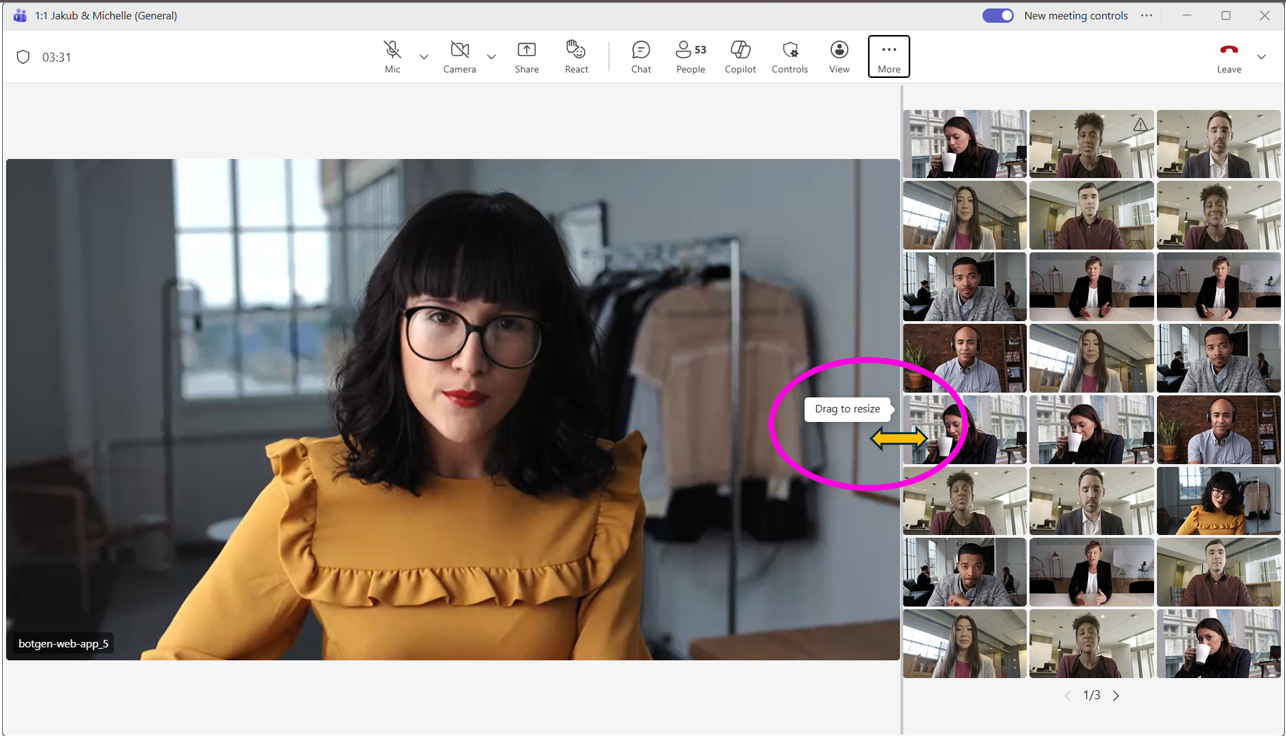
1. Flexible layout for Teams meetings with resizable divider 

We’re introducing a new flexible layout option in future Teams meetings to give users more control over how shared content and participant videos appear. A resizable divider will let users adjust the space between shared content and the video gallery. Coming early February 2026, expected completion by late March 2026.

blog_featured_nov2025_ignite_1

 
2. Private chat for organizers and presenters in structured meetings, webinars, and town halls

This separate chat enhances collaboration by allowing key participants to communicate privately before, during, and after the event, without involving attendees.  Coming mid-February 2026 and is expected to complete by late February 2026. 


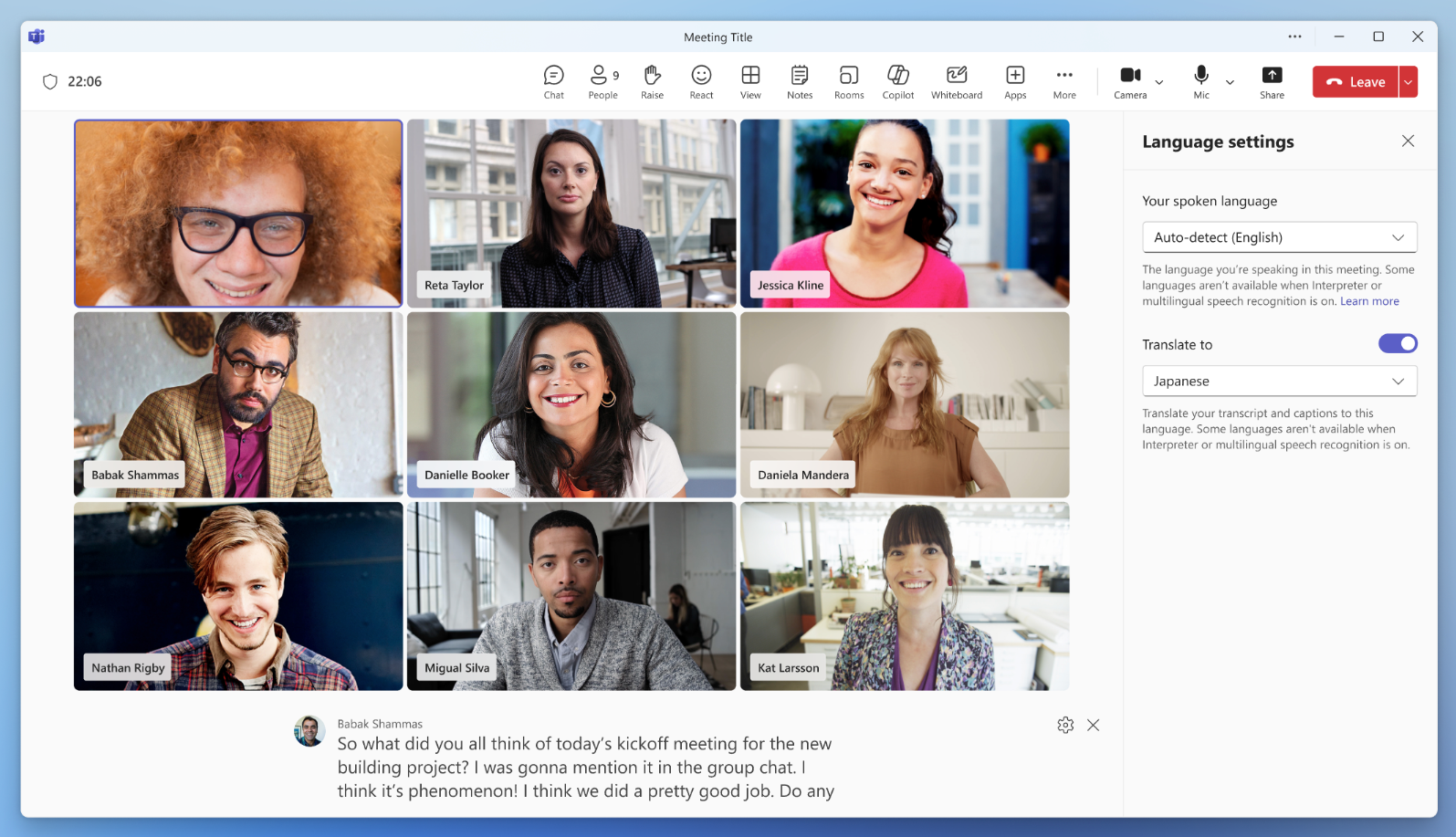
3. Enhancements to Interpreter and multilingual meeting experience

**Requires a Microsoft 365 Copilot license**

  • Automatic spoken language detection – Teams now automatically detects and updates the spoken language across Interpreter, live captions, and transcription—no manual setup required.
  • “Preparing” status indicator – A new visual cue shows when the Interpreter is initializing, helping users know when it’s ready.
  • Simplified settings – Interpreter settings now include clear explanations for each option, making setup easier and reducing confusion. 

Coming mid-December 2025 and expect to complete by late December 2025. 

blog_featured_nov2025_ignite_2


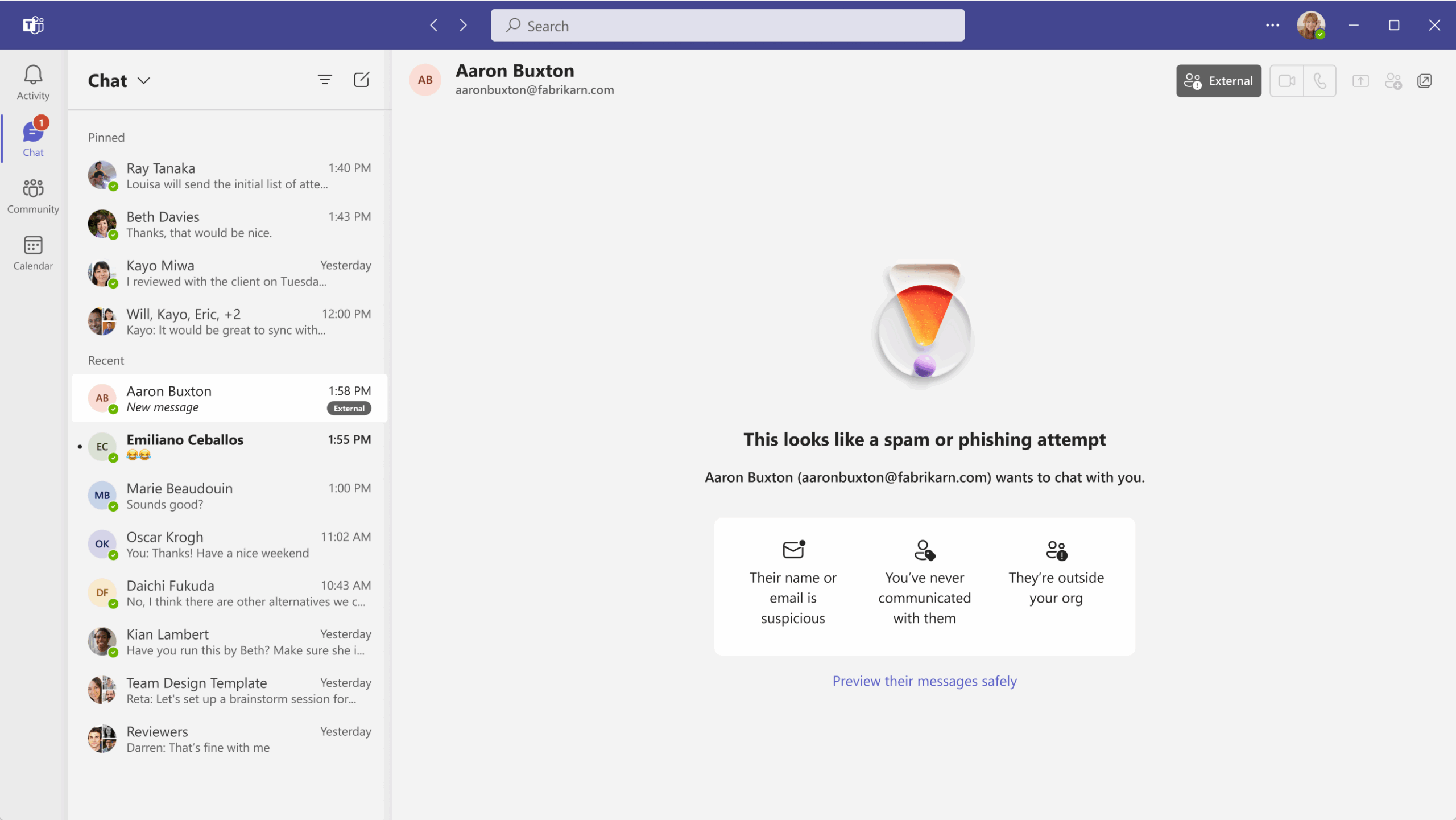
4. Protection against tenant-owned domain impersonation in Teams chat 

If your organization allows external domains to contact users in Teams, we will identify if an external user is impersonating a domain owned by your tenant during their initial contact through Teams chat. If we detect potential impersonation, we will show a high-risk alert to the user, notifying them to check for suspicious name/email and proceed with caution.

  • Before rollout: Teams only scanned for brand impersonation risks.
  • After rollout: Teams will check for both brand and tenant-owned domain impersonation attempts

Coming early December 2025 and expected to complete by mid-December 2025. 

blog_featured_nov2025_ignite_3

 
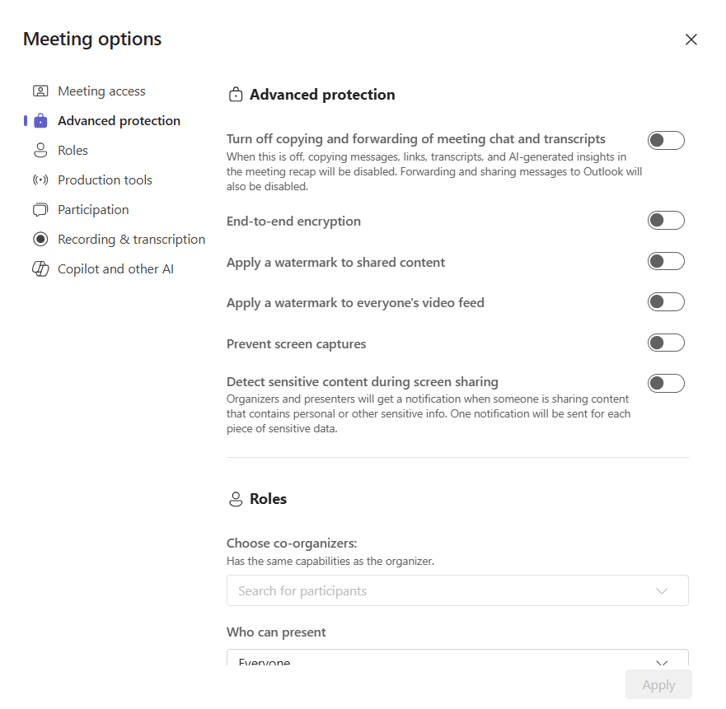
5. Prevent screen capture (Premium feature)

Helps protect sensitive meeting content by blocking screenshots and recordings across supported platforms. When enabled by the meeting organizer, this feature restricts screen capture using native device tools and most third-party apps. Coming early November 2025 (previously mid-October) and expect to complete by late November 2025 (previously late October). 

blog_featured_nov2025_ignite_4


6. Introducing simplified admin controls to manage external collaboration in Teams admin center

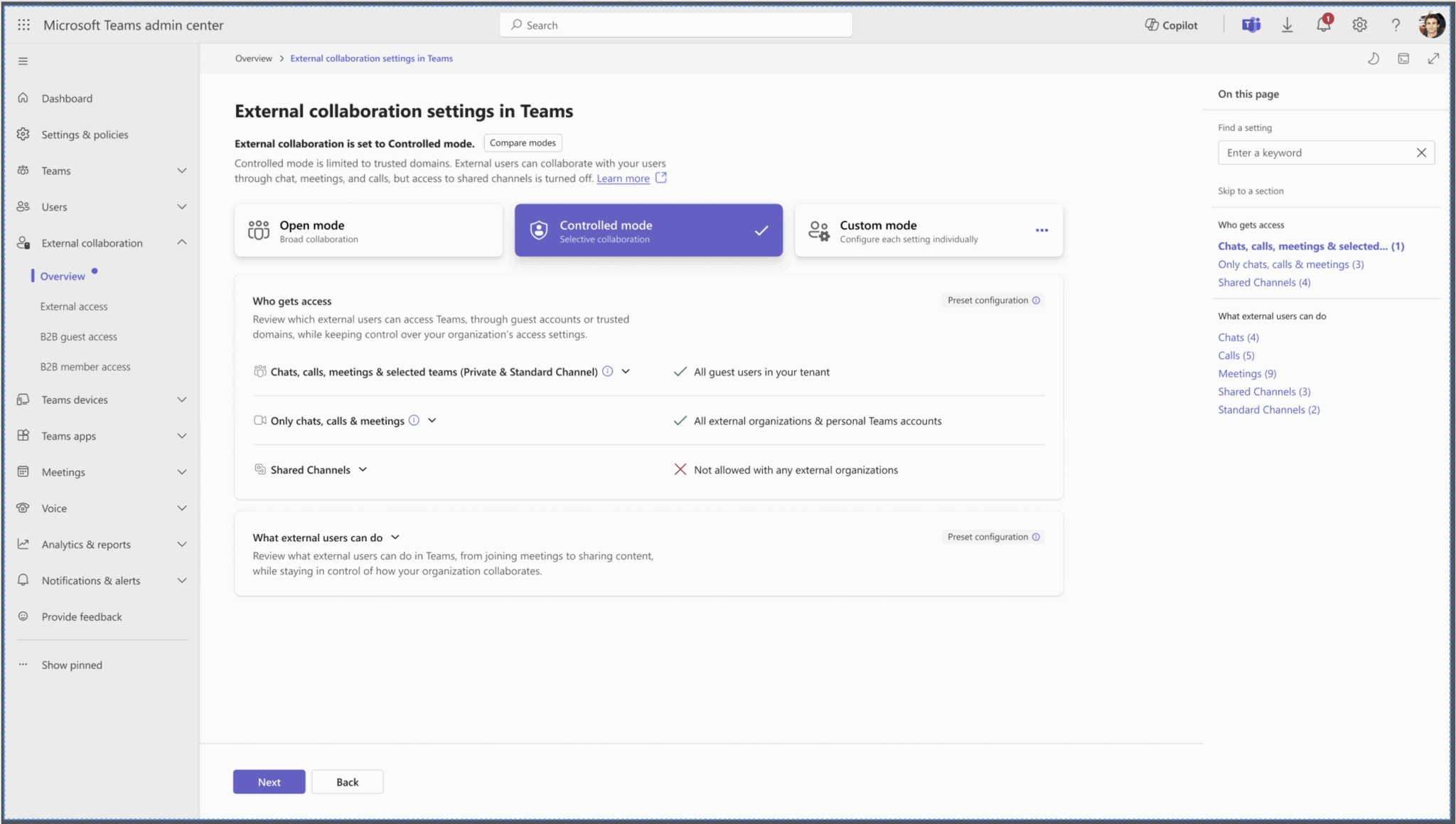
Introducing a simplified external collaboration (EC) admin experience in Microsoft Teams to help administrators manage external collaboration settings more efficiently. This update introduces two predefined collaboration modes—Open and Controlled—as well as a Custom mode for organizations with unique requirements.   

Admins can choose from three collaboration modes:

Open (Mode 1):

  • Enables chats, calls, and meetings with all external domains and Teams personal accounts using federation or external access.
  • Allows Teams and channels collaboration with Microsoft and non-Microsoft partners using B2B collaboration and B2B direct connect.

Controlled (Mode 2):

  • Aligns with current defaults for enterprise and EDU tenants.
  • Enables chats, calls, and meetings with all external domains using federation or external access.
  • Blocks collaboration in shared channels.

Custom:

  • Provides full control over each external collaboration setting.
  • Allows manual configuration of org-wide external collaboration policies across chats, calls, meetings, Teams, and channels (including shared channels).
  • Changes in Custom mode apply only to Global org-wide policies and settings; they do not affect custom policies. 

Coming late January 2026; expected completion by early February 2026. 

blog_featured_nov2025_ignite_5

blog_featured_nov2025_ignite_6


exchange-logo-150x150

Microsoft Outlook


New Features


1. Native polls integrated into New Outlook calendar compose form

This enhancement helps users propose multiple time slots and gather attendee preferences—especially useful when scheduling with external participants or individuals with limited availability. Coming late October 2025 and is expected to complete by early December 2025. 

blog_featured_nov2025_ignite_7

 
2. Book a workspace when creating an event

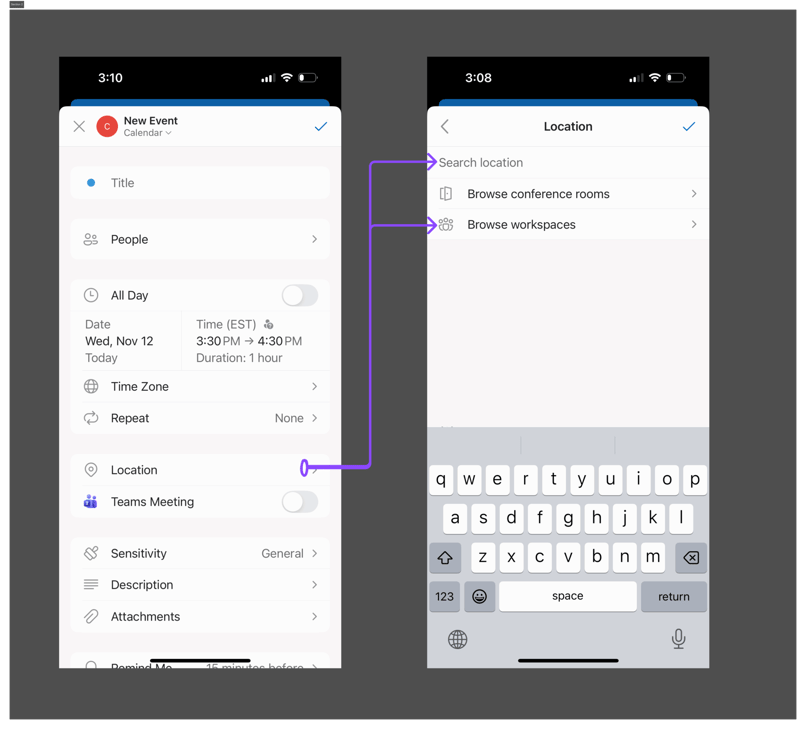
To streamline workspace scheduling, users can now book a workspace directly from the location field when creating a calendar event. Coming early December 2025 and is expected to complete within the same timeframe. 

blog_featured_nov2025_ignite_8

NewOfficelogo

Microsoft 365 Apps


New Features


1. Modern Access Request and Access Denied web page

Introducing a visual refresh of the Access Request and Access Denied page experience across Microsoft 365, redesigned to help users quickly request access to content such as documents, SharePoint sites, or Teams meeting recordings. 

Coming early January 2026 and expect to complete by early February 2026. 

blog_featured_nov2025_ignite_9


NewIntuneLogo

Microsoft Intune


New Features


1. New Agents with Security Copilot

Change Review Agent, Policy Configuration Agent, Device Offboarding agent 

Full Announcement: What’s new in Microsoft Intune at Ignite – Microsoft Intune Blog 

blog_featured_nov2025_ignite_10

 
2. Admin Tasks

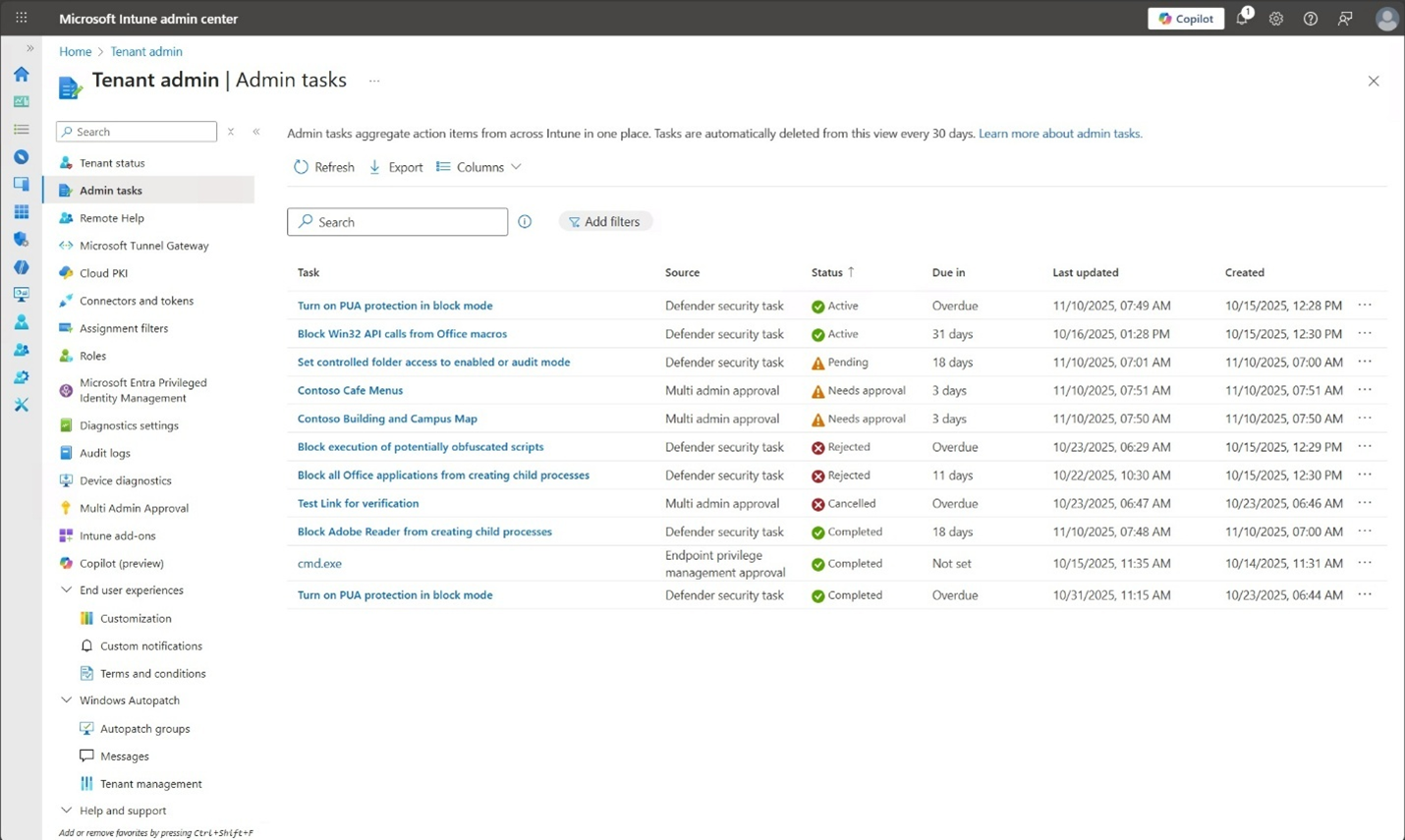
A centralized view for high-priority items, so admins can act quickly on what matters most. Today, that includes critical approvals like elevation requests, multi-admin approvals, and security tasks.  Expected first quarter of calendar year 2026.

Full Announcement: What’s new in Microsoft Intune at Ignite – Microsoft Intune Blog 

blog_featured_nov2025_ignite_11

 
3. Scalable Windows Resiliency with new recovery tools 

In Preview now:

  • Quick machine recovery is a Windows capability that automatically detects, diagnoses, and remediates boot critical issues from WinRE, helping restore productivity without requiring hands-on, in-person intervention.
  • Point-in-time restore for Windows, a new recovery capability that enables devices to be rolled back toa previous state within minutes. 

Full Announcement: Scalable Windows Resiliency with new recovery tools – Windows IT Pro Blog 

Windows Autopatch — Elevate Your Update Experience for Modern Work – Windows IT Pro Blog 

blog_featured_nov2025_ignite_12

 
4. Edge for Business to enable secure access for contractor-managed devices 

Microsoft Edge for Business is introducing a cost-effective solution that enables secure access to work resources on contractor-managed devices. Admins can currently support Bring Your Own Device (BYOD) scenarios on Edge for Business by using Intune Mobile Application Management (MAM). With this update, coming to preview beginning in January, those Intune MAM protections will extend to devices managed by other organizations.  

Admins will be able to set up a MAM profile on an externally managed device, creating a controlled browser environment in Edge for Business 

Full Announcement: Scalable Windows Resiliency with new recovery tools – Windows IT Pro Blog 


entra_logo

Microsoft Entra


New Features


1.  Soft deletion and restoration for cloud security groups

To help organizations recover from accidental or malicious deletions, Microsoft Entra is introducing soft deletion and restoration for cloud security groups. This feature allows deleted groups to be restored within 30 days, preserving their settings, ownership, and membership—reducing the need to rebuild access models from scratch. 

Coming late February 2026 and is expected to complete by early March 2026.


2. Synced Passkeys

Microsoft Entra now supports synced passkeys from Apple, Google, and other credential providers, which offers easy registration and authentication experiences while protecting against phishing. Currently in Preview.

Full Article: How to Enable Synced Passkeys (FIDO2) in Microsoft Entra ID (Preview) – Microsoft Entra ID | Microsoft Learn 


Microsoft-Copilot-Logo-150x150

Microsoft Copilot


New Features


1. Microsoft Agent 365

Agent 365 brings observability at every level of the AI stack. Whether you create agents with Microsoft tools, open-source frameworks, or third-party platforms, Agent 365 helps you observe, manage, secure, and govern them.  Currently in Preview (Frontier Program). 

More info: Microsoft Agent 365: The control plane for AI agents | Microsoft 365 Blog 


2. Microsoft Teams: Custom AI summary now available in Meeting Recap

The Custom AI Summary feature allows Copilot users to create tailored meeting notes using sample content, instructions, or prebuilt templates.

Coming mid-December 2025 and is expected to complete by mid-January 2026.

blog_featured_nov2025_ignite_13
 
3. Schedule meetings directly in Copilot Chat

This enhancement reduces context switching by allowing users to find available times, book rooms, draft agendas, and send invites—all within the chat experience. Rollout is beginning now and is expected to complete by late January 2026. 

blog_featured_nov2025_ignite_14

 
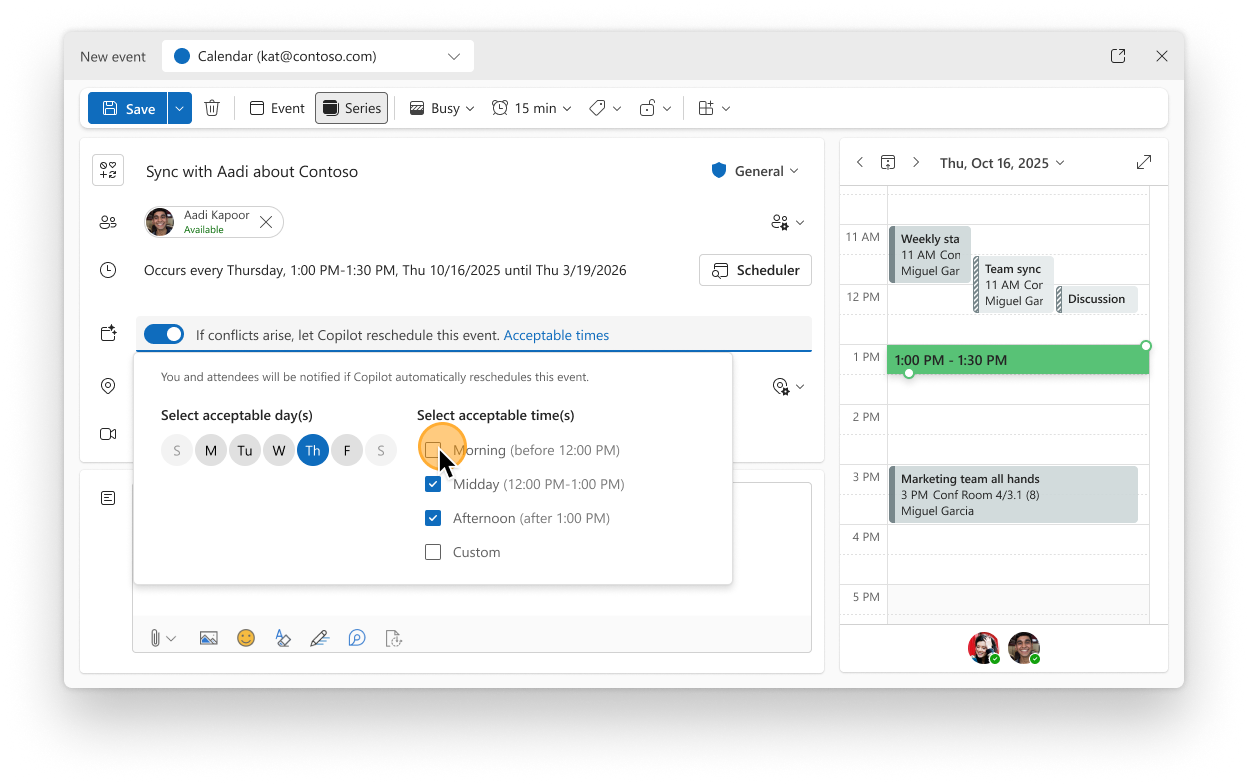
4. Copilot can now automatically reschedule 1:1 meetings and personal events based on your preferences

Copilot is making it easier to manage scheduling conflicts by automatically rescheduling 1:1 meetings and personal events. Within the meeting event form, users can indicate which events are more flexible and allow Copilot to reschedule them if conflicts arise.

Users can also set preferences for when rescheduled events should occur. Copilot will detect double-bookings and automatically move these flexible events to a better time—saving users time and reducing manual coordination.

Coming mid-November 2025 and expected to complete by late December 2025 (previously late November). 

blog_featured_nov2025_ignite_155. Microsoft 365 Copilot: OpenAI’s Sora 2 available for video generation
We’re introducing OpenAI’s Sora 2, an advanced video generation model, into Microsoft 365 Copilot. This integration enables licensed Microsoft 365 Copilot users in the Frontier Program to create short, AI-generated videos using natural language prompts. The feature helps organizations accelerate creative workflows while maintaining enterprise-grade security and compliance. 

In Preview (Frontier): Available now for Microsoft 365 Copilot licensed users in the Create experience under the Frontier program. 

blog_featured_nov2025_ignite_16


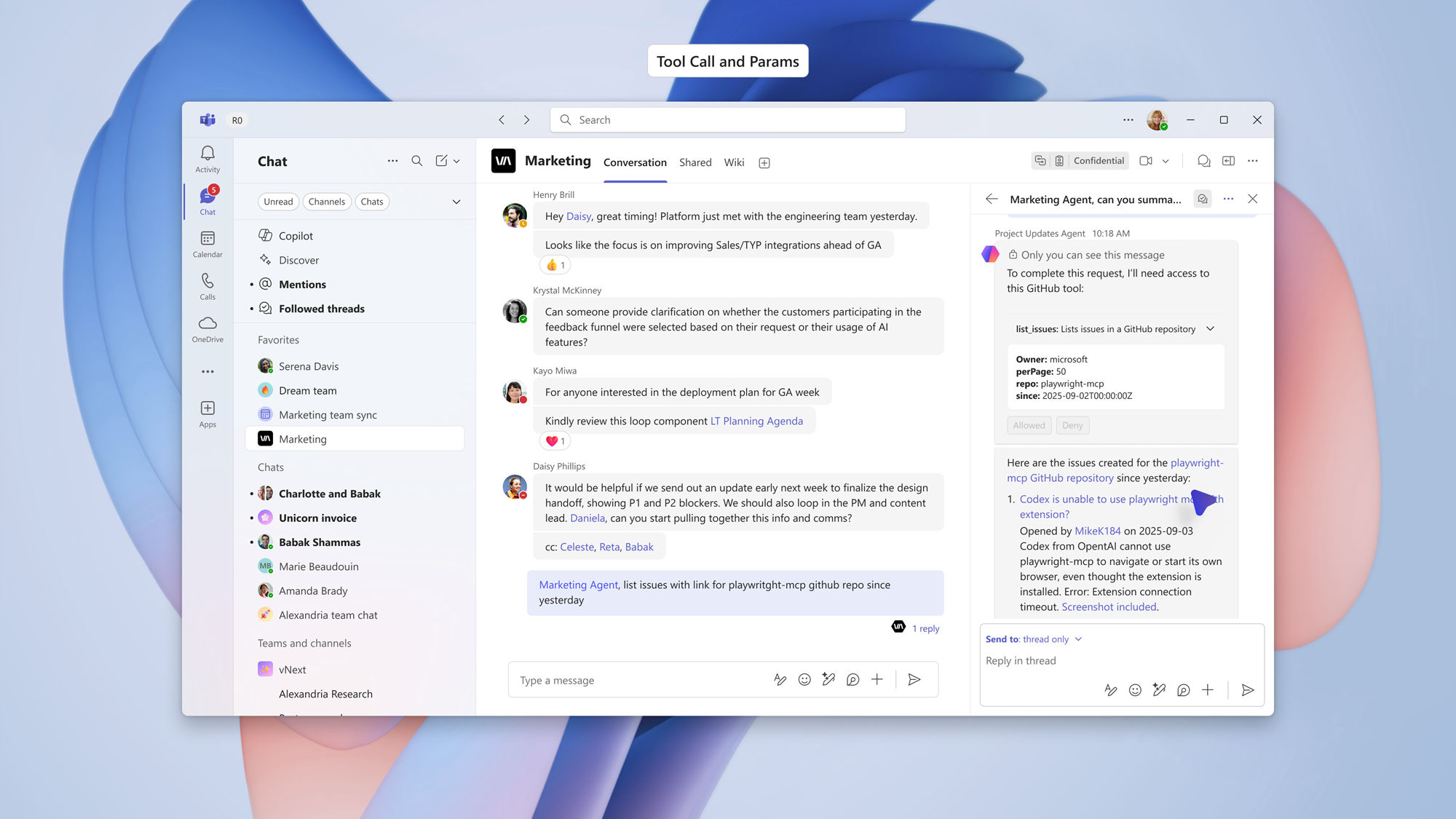
6. Microsoft Teams: Channel agent orchestration with GitHub, Asana, and Jira via Model Context Protocol (MCP)

Enables Channel Agent to orchestrate tasks with select third-party Model Context Protocol (MCP) servers, including GitHub, Asana, and Atlassian (JIRA). This integration supports collaborative workflows that reflect real human teamwork, allowing agents to transparently reason through tasks and gather information across tools. 

Coming mid-November 2025 and is expected to complete by mid-December 2025. 

blog_featured_nov2025_ignite_17


7. Agent Mode in the Office apps

Now you can create world-class Office artifacts whether you start in Copilot chat or in the apps. With Agent Mode in Excel, users can now choose between Anthropic and OpenAI reasoning models. Agent Mode in Word is now generally available, and Agent Mode in PowerPoint is now available via the Frontier program. And new Word, Excel, and PowerPoint Agents allow you to create high-quality documents, spreadsheets, and presentations in Copilot chat. Available via the Frontier program.


8. Voice turns Microsoft 365 Copilot into your thought partner 

Earlier this month we announced voice in the Microsoft 365 Copilot mobile app. Today, we’re expanding that offering, introducing voice in Microsoft 365 Copilot app on desktop and the web, as well as in the Microsoft 365 apps, starting with Outlook, Word, and PowerPoint, and a new wake word “Hey Copilot” – an opt-in feature to start a voice chat hands-free on Windows devices. 

Full Announcement: Voice turns Microsoft 365 Copilot into your thought partner. | Microsoft Community Hub 


9. New Copilot Chat value for users without a Microsoft 365 Copilot license 

Copilot Chat will provide even more value in Outlook, Word, Excel and PowerPoint for users without a Microsoft 365 Copilot license. In Preview by March 2026.


10. Updates to Microsoft Purview address key security issues 

Microsoft Purview Data Loss Prevention (DLP) for Microsoft 365 Copilot will help ensure sensitive information stays protected. If a prompt includes confidential data such as credit card numbers or personal details, Microsoft Purview DLP for Copilot prompts, now in preview, will block Copilot and agents from responding, so that the sensitive information will not be used for grounding in Microsoft 365 or through a web search. 

Overshared link remediation, now in preview in Microsoft Purview Data Security Posture Management (DSPM) for SharePoint, will enable admins to identify and fix overshared links at scale, reducing exposure and strengthening compliance. Microsoft Purview AI Observability in DSPM, now in preview, will provide full visibility into all agents, helping security teams make informed decisions and proactively manage risk. 

blog_featured_nov2025_ignite_18

 
11. Edge for Business introduces Copilot Mode

Microsoft Edge for Business will soon support summarization and contextual grounding with Microsoft 365 Copilot Chat.

This enhancement enables users to ask Copilot questions about multiple open browser tabs, Microsoft 365 documents (such as Word, Excel, PowerPoint), and YouTube videos directly from the Edge side pane.

Agent Mode: Makes the browser capable of taking actions on a user’s behalf with multistep workflows on IT-approved websites. 


Admin-logo-2-150x150

Microsoft Admin


New Features


1. Upcoming Changes to Entra Identity Protection Alert Settings in Defender XDR 

To improve alert clarity and reduce fatigue, Microsoft Defender XDR is introducing enhanced configuration options for identity-related alerts from Entra ID Protection.

  • Alert ingestion logic will now be explicitly tied to Entra ID Protection risk levels.
  • Admins can choose which alerts to ingest into Defender XDR based on:
  • High risk detections only
  • High + Medium risk detections
  • All detections
  • Updated UI strings and visuals will improve clarity and usability.
  • The default setting is changing from ingesting alerts of all severities to ingesting only alerts with severity = High. As a result, you may notice a reduction in alert volume, and some alert types will no longer be ingested into Defender XDR. You can always change the default setting to any of the other options – High + Medium or All detections, according to your organization’s needs. 

Public Preview starting December 11, 2025.


2. Copilot for Business

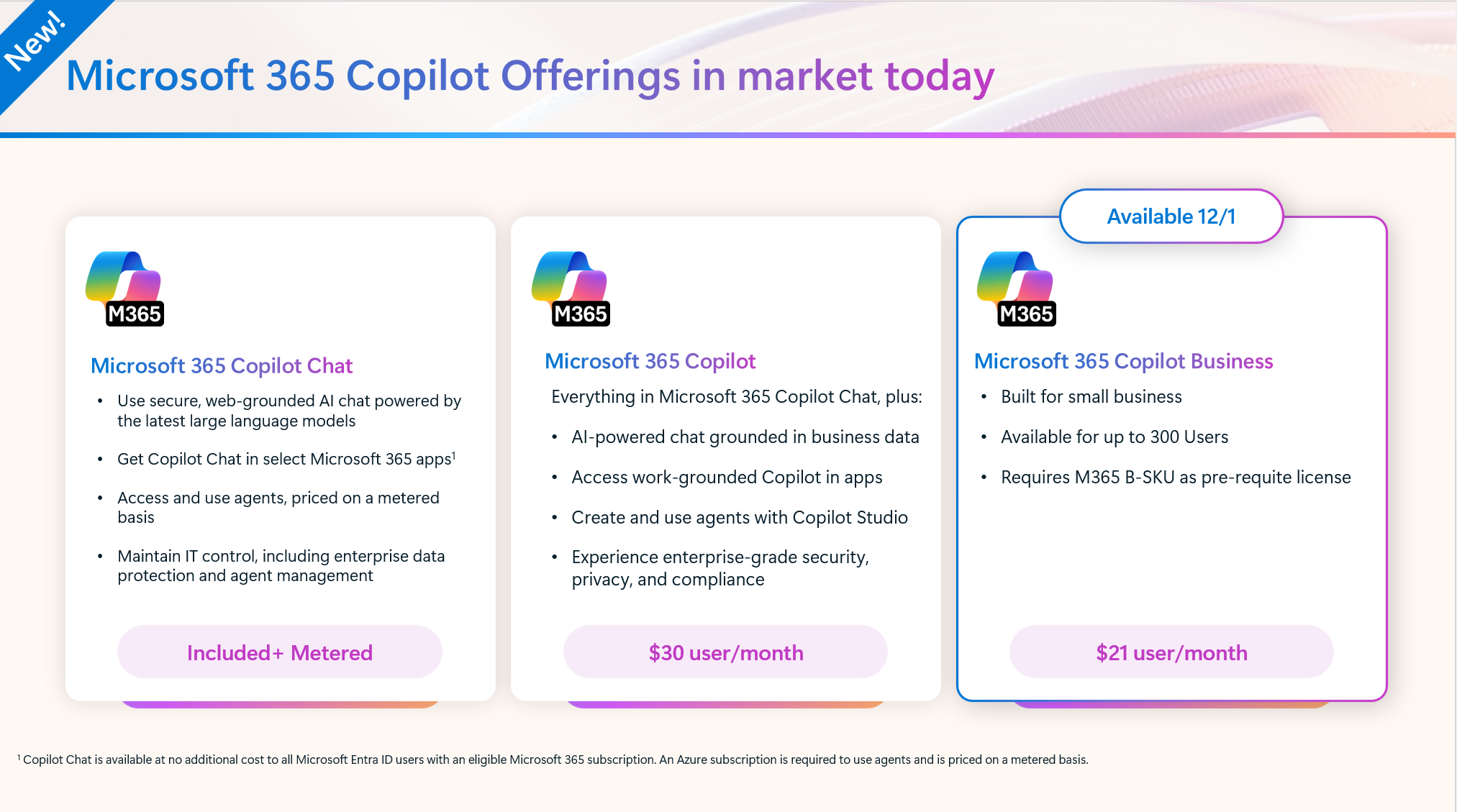
New Copilot license for SMB (under 300 users). Same Copilot capabilities for $21/u/m (vs 30) 

Full Breakdown: https://blog.cloudcapsule.io/blog/microsoft-365-copilot-for-business-what-you-need-to-know

bog_copilot_smb_1


3. Security Copilot included in E5

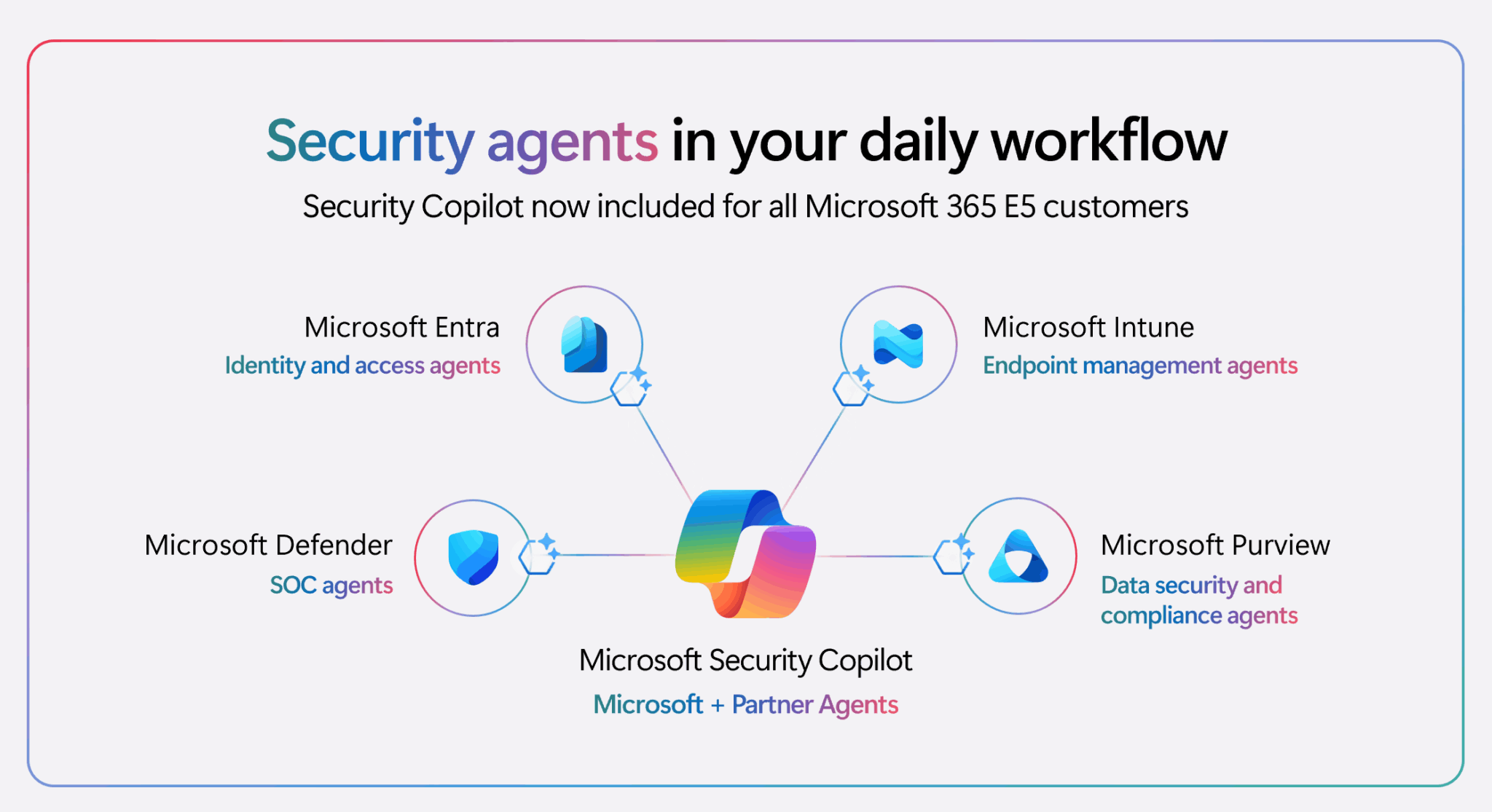
Security Copilot will be included for all Microsoft 365 E5 customers in the upcoming months – bringing agentic AI in the daily workflow. Customers will receive a 30-day advanced notification before activation. If you’re already a Microsoft 365 E5 customer using Security Copilot, you can access this benefit at no additional cost. 

Rollout starts November 18, 2025, for existing Security Copilot customers with Microsoft 365 E5, and will continue in the upcoming months for all Microsoft 365 E5 customers. Customers will receive a 30-day advanced notification before activation. 

blog_featured_nov2025_ignite_20


4. Announcing Microsoft Baseline security mode

Available in the Microsoft 365 admin center, BSM is simple to use yet offers advanced capabilities enabling you to easily:

  • Disable legacy settings and enable secure-by-default configurations.
  • Run simulations for complex settings to assess user and app impact.
  • Deploy protections you have always wanted with just a few clicks. 

Full Announcement: Ignite’25 Spotlight: Announcing Microsoft Baseline security mode | Microsoft Community Hub 

blog_featured_nov2025_ignite_21

What’s New in Microsoft 365 | November Updates | Ignite Highlights

18 min read

What’s New in Microsoft 365 | November Updates | Ignite Highlights

Microsoft announced quite a few new features and licenses options during their annual Microsoft Ignite 2025 conference in San Francisco....

Read More
Microsoft 365 Copilot for Business: What You Need to Know

5 min read

Microsoft 365 Copilot for Business: What You Need to Know

Microsoft just dropped a brand-new Copilot SKU specifically for small and medium businesses. Lower cost, same Copilot capabilities. Let me...

Read More
Autopilot Device Preparation Tutorial | Is it better than v1?

16 min read

Autopilot Device Preparation Tutorial | Is it better than v1?

Windows Autopilot has been around for years, and many admins have built entire deployment processes around what we now call “Autopilot V1.”...

Read More