

6 min read

Microsoft Is Killing the Free Grace Period

Microsoft Is Killing the Free Grace Period


Big changes are coming to how Microsoft handles subscription renewals in the CSP program. If you’re an MSP, this affects you and every customer you manage.

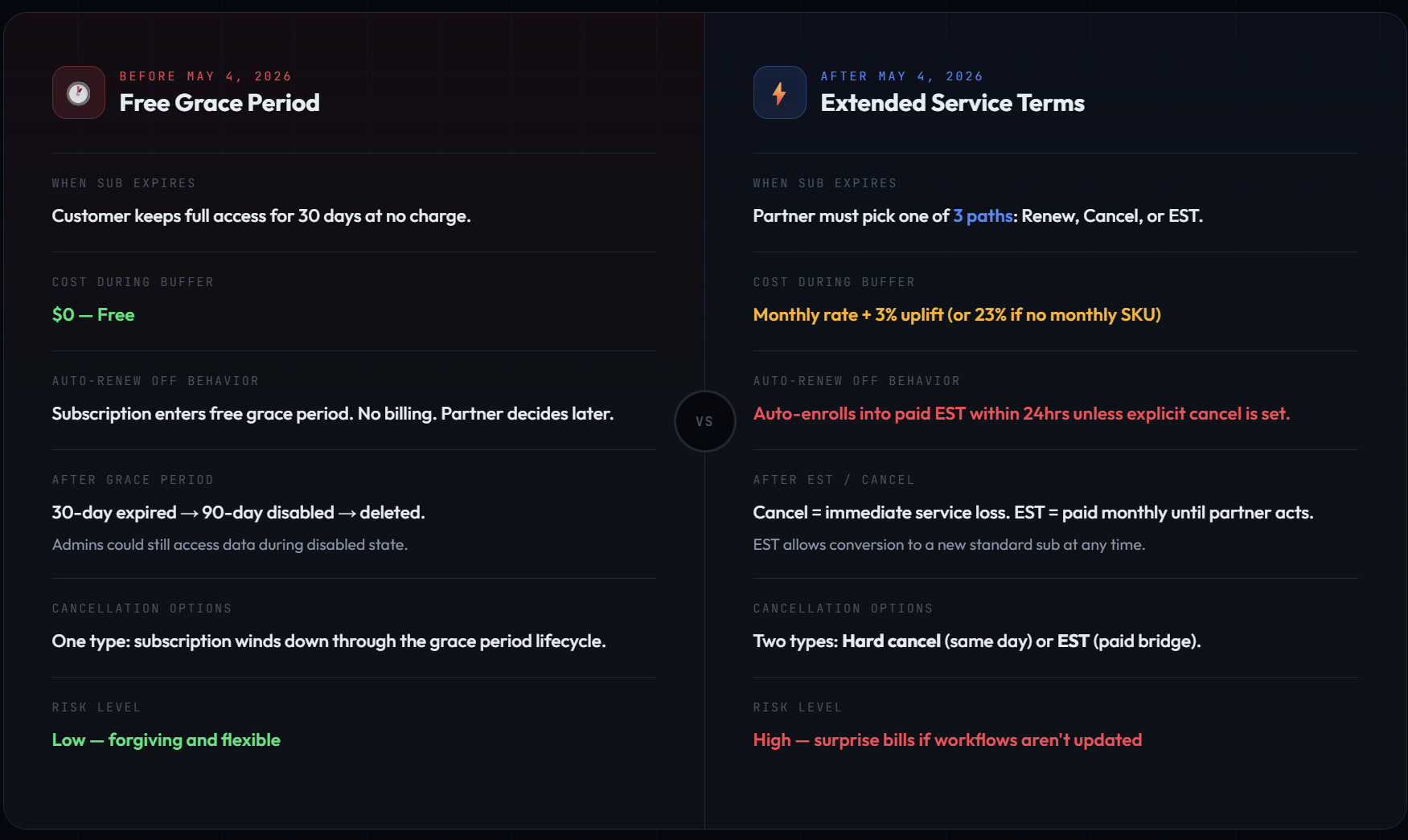
The short version: the free 30-day grace period that kicks in when a subscription expires is going away. Starting May 4, 2026, Microsoft is replacing it with a paid system called Extended Service Terms (EST). If you don’t update your workflows, you could get surprise bills for subscriptions you thought were winding down.


How Things Work Today

Right now, when a CSP subscription hits the end of its term and auto-renew is turned off, the customer doesn’t lose access right away. Instead, the subscription enters a free grace period that lasts about 30 days. During that window, everything keeps working. Users can still log in. Email still flows. Files are still there. And nobody gets billed.

After the 30-day grace period ends, the subscription moves into a 90-day “disabled” state where admins can still access data but users are locked out. Then after 90 more days, it’s deleted.

This grace period has been a safety net for MSPs. It gives you breathing room to have the renewal conversation with your customer, sort out budget approvals, or just deal with the everyday chaos of running a business. It’s forgiving. It’s flexible. And it’s free.

That’s all going away.

What’s Changing

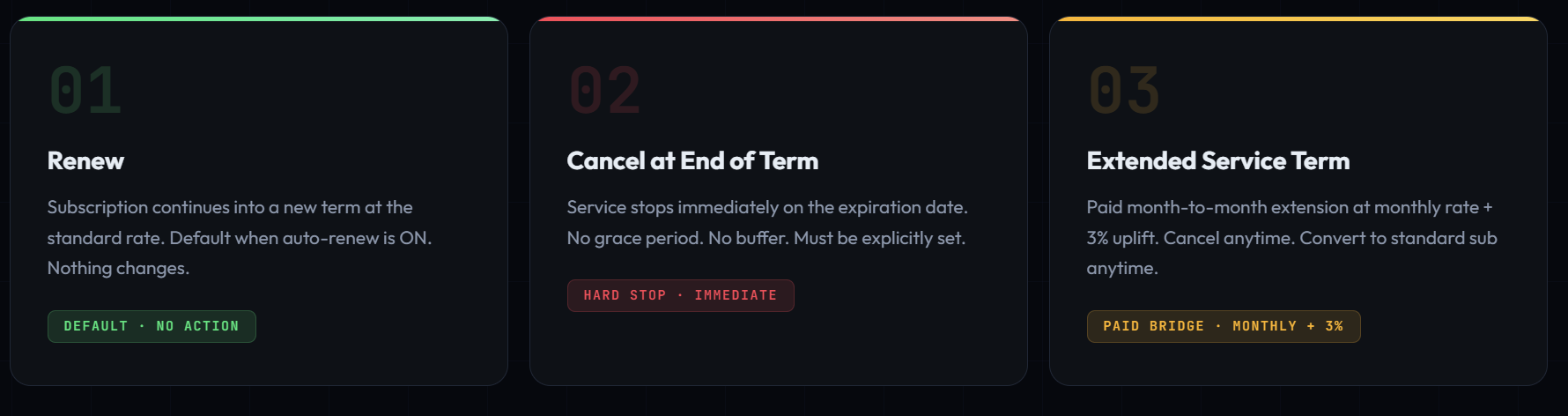
Starting May 4, 2026, when a subscription reaches its end of term, there are now three options.

No more grace period. No more waiting around. You have to pick one.

blog_freegraceperiod_1

Path 1 — Renew. The subscription rolls into a new term at the normal rate. This is the default if auto-renew is ON. Nothing changes here.

Path 2 — Cancel at End of Term. The subscription ends on its expiration date and the customer loses access that same day. No buffer. No grace period. It’s a hard stop. You have to explicitly choose this option.

Path 3 — Extended Service Term (EST). This is the paid replacement for the old grace period. The subscription keeps running month to month, but now it costs the monthly rate plus a 3% uplift. If there’s no monthly SKU for that product, the uplift is 23%. You can cancel EST at any time or convert it back into a regular subscription.

blog_freegraceperiod_2

Once You’re in EST, What Can You Do?

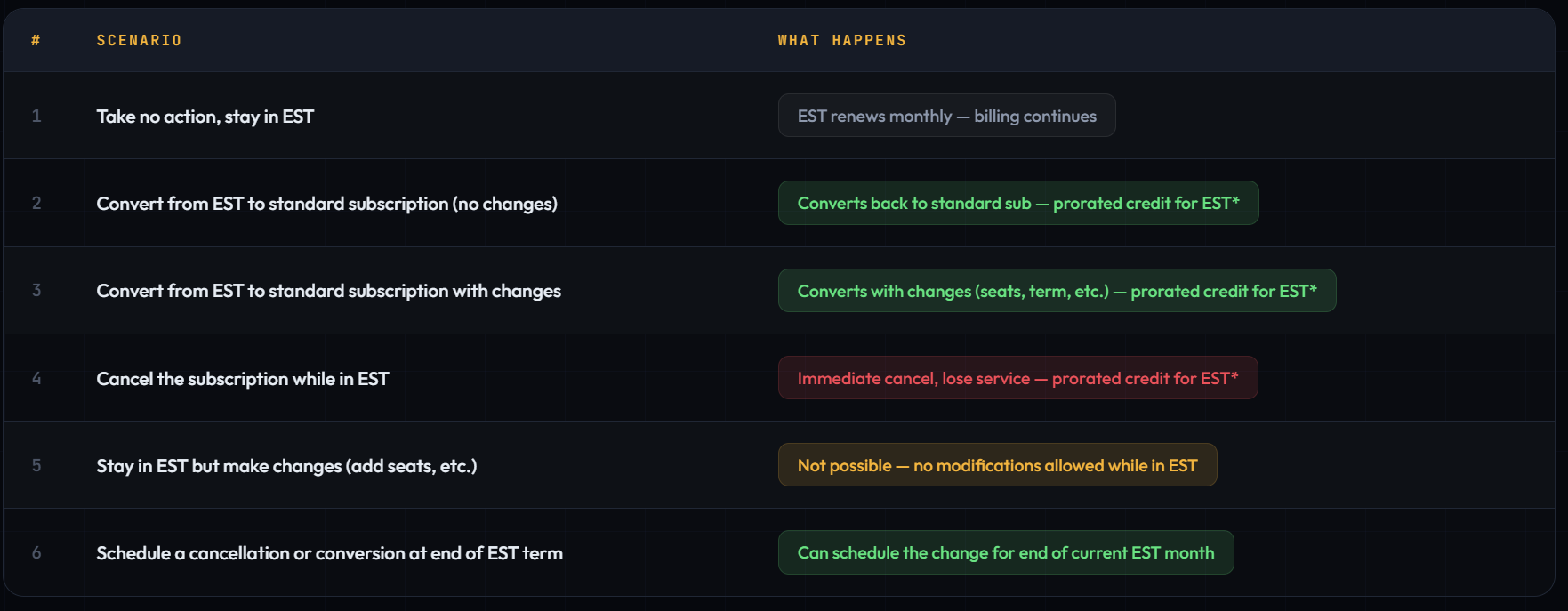
If a subscription does move into EST, you’re not stuck forever. But you are limited in what you can do. Here are your options:

blog_freegraceperiod_3

The big thing to know: you cannot make changes to a subscription while it’s in EST. No adding seats, no changing the term. If you want to make changes, you have to convert it back to a standard subscription first. The good news is you get a prorated credit for any unused EST time when you convert or cancel.

blog_freegraceperiod_4

What You Should Do Right Now

  • Audit your subscriptions. Pull a list of every subscription with auto-renew set to OFF. For each one, decide: should it renew, cancel, or go to EST? Partner Center now offers a data export of all EST-eligible subscriptions to help.

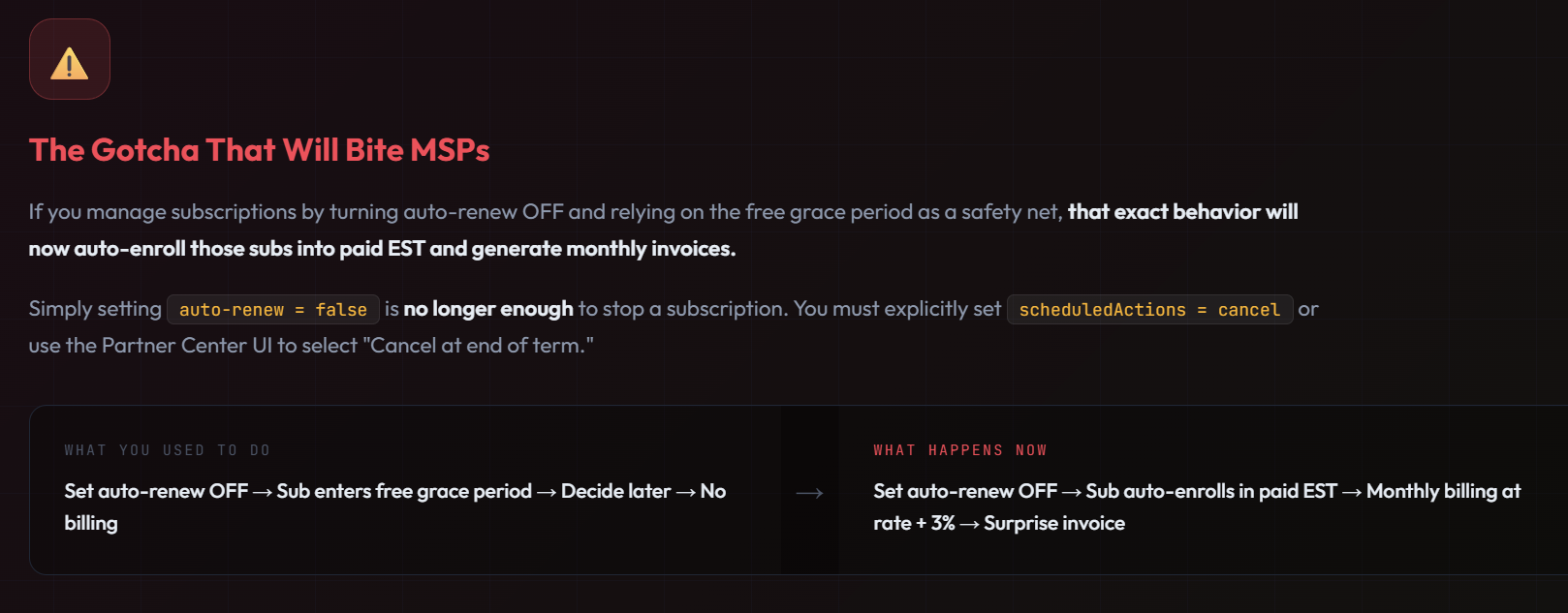
  • Set explicit cancel actions. For anything you want to end, don’t just turn off auto-renew. You have to explicitly set it to cancel at end of term. This is the only way to avoid automatic EST enrollment.

  • Check with your distributor. If you buy licensing through a distributor like Pax8, Sherweb, TD SYNNEX, or Ingram, you need to find out how this will work in their platform. The cancel workflows and EST behavior may look different in your distributor’s portal than in Partner Center directly. Some distributors may not have the “renew into EST” option available yet. Ask them: how do I set an explicit cancel at end of term? How will EST show up in my billing? Get those answers now, not in May.

  • Update your tools and processes. If your PSA, billing system, or internal playbook uses auto-renew OFF as a “pending decision” state, that workflow now means “enroll in paid EST.” Update it.

  • Talk to your customers now. Don’t wait. Customers need to know that letting a subscription lapse no longer means free service for 30 days. Use the templates below.

Customer Outreach Templates

 
Subject: Important Change to Your Microsoft 365 Renewals

Hi [Customer Name],

Microsoft is changing how subscription renewals work starting May 2026. Previously, if a subscription wasn’t renewed on time, there was a free 30-day window where everything kept working even if there was a lapse in a subscription expiration. That free window is going away.

Going forward, subscriptions will either renew automatically, cancel immediately (with no buffer), or move to a paid month-to-month extension. Your subscriptions are not set to auto-renew today so we need to review your options with you on a call. Would any of the following times work in the coming week?


Subject: Action Needed – Your [Product] Subscription Renewal by [Date]

Hi [Customer Name],

Your [Product Name] subscription is set to expire on [Date]. Due to a recent Microsoft change, we need to confirm what you’d like to do before that date. There is no longer a free grace period after expiration.

Your options:

(1) Renew for another year at the current rate,

(2) Cancel – access stops on [Date] with no extension, or

(3) If you need more time to decide, we can set up a paid month-to-month extension.

Please let us know by [Date] so we can avoid any surprise charges or service disruptions.


Frequently Asked Questions


If a subscription expires and gets cancelled, can I reactivate it?

No. You have never been able to reactivate an expired NCE subscription. You have to purchase a new one. However, the normal data retention lifecycle still applies. Data is preserved through the expired and disabled states (up to 120 days total) before deletion. If you spin up a new subscription during that window, data and license assignments can be restored.

What’s the difference between EST and just buying a monthly subscription?

Monthly term subscriptions can’t be cancelled outside the first 7 days after purchase or renewal. After that, you’re on the hook for the full month. EST can be cancelled at any point during the month with prorated billing. So if you only need licenses for 10 days to finish a migration, EST lets you cancel and only pay for those 10 days. Monthly subs would charge you for the full month.

What does the 3% vs. 23% uplift mean?

Most common M365 SKUs (Business Basic, Business Premium, E3, E5, etc.) have a monthly plan available in the price list. For those, EST bills at the existing monthly rate plus 3%. The 23% uplift applies to products that don’t have a monthly SKU at all, typically niche products, specialized offers, or certain Dynamics/Power Platform SKUs that only come in annual terms. For those, Microsoft derives a monthly rate and adds 23%.

Does this affect subscriptions with auto-renew set to ON?

No. If auto-renew is on, the subscription renews as it always has. EST only comes into play when auto-renew is off. If you’re not touching the auto-renew setting, nothing changes for you.

I bought a subscription before April 1, 2025. Am I affected?

It depends on whether it has renewed since then. The eligibility rule says “purchased or renewed on or after April 1, 2025.” If your subscription auto-renewed in, say, June 2025, that renewal counts, it’s now eligible for EST when it next expires. If it’s a multi-year term that hasn’t renewed since before April 2025, the old grace period rules still apply for the current term.

Will my distributor support EST?

Not necessarily, and not on the same timeline as Microsoft. Some distributors may not have the “renew into EST” option available in their portal yet. What distributors label as “cancel” in their UI may actually just be disabling auto-renew at the Microsoft level, which under the new rules means EST enrollment, not cancellation. Contact your distributor and ask specifically how to set an explicit cancel at end of term in their platform.

Can I make changes to a subscription while it’s in EST (add seats, change SKU, etc.)?

No. While a subscription is in EST, no modifications are allowed. No adding or removing seats, no changing the term, no SKU swaps. If you need to make changes, you have to convert it back to a standard subscription first, then make the changes. You’ll get a prorated credit for any unused EST time when you convert.

What happens if I’m transitioning a customer between subscription types and the old sub expires?

Be careful with timing. MSPs have reported entire tenants going down when cancelling one subscription type to switch to another, because the cancellation processed before the new subscription activated. The best practice is to always overlap. Purchase the new subscription first, confirm it’s active, then cancel the old one. Don’t cancel first and purchase second.

Does this apply to trials or end-of-sale SKUs?

No. According to Microsoft’s documentation, trials and end-of-sale SKUs are not eligible for EST. End-of-sale SKUs with conversions (endofsalewithconversion) are eligible.

Does this apply to education, nonprofit, and government tenants?

Yes. Microsoft’s documentation confirms EST applies to commercial and public sector subscriptions, including education, nonprofit, and government community cloud (GCC). However, there has been no indication that GCC-High licensing (which is under AOS-G, not CSP/NCE) is affected by this change.

Official Microsoft Docs

Use Extended Service Terms (EST) for Cloud Solution Provider (CSP) subscriptions – Microsoft Learn

And the announcements backing it up:

Microsoft Is Killing the Free Grace Period

8 min read

Microsoft Is Killing the Free Grace Period

Big changes are coming to how Microsoft handles subscription renewals in the CSP program. If you’re an MSP, this affects you and every...

Read More
How to Use Exact Data Match (EDM) to Eliminate DLP False Positives in Microsoft 365

8 min read

How to Use Exact Data Match (EDM) to Eliminate DLP False Positives in Microsoft 365

If you’ve ever set up a DLP policy in Microsoft 365, you’ve probably experienced the false positive problem. You create a rule to catch...

Read More
How Guest Users Get Created in Your Microsoft 365 Tenant

7 min read

How Guest Users Get Created in Your Microsoft 365 Tenant

Guest users are one of the most powerful collaboration features in Microsoft 365. They allow organizations to work with vendors,...

Read More