



8 min read

What’s New in Microsoft 365 | March 2026 Updates

What’s New in Microsoft 365 | March 2026 Updates


Microsoft released quite a few high-impact updates this past month, and Nick gives you the streamlined summary to capture just what you need. Be sure to check out the full video and list below!

Here are a few highlights:

  • Teams - Video Recaps

  • Teams - Identify External Bots in Teams Meetings

  • Outlook - Follow Meetings on Outlook Mobile
  • Targeted file and folder restores in Microsoft 365 Backup
  • Improved OneDrive sync experience for macOS users 
  • Entra Backup & Recovery
  • External MFA in Entra ID
  • Copilot Cowork
  • Federated Copilot Connectors 
  • Anthropic Claude Sonnet is now available in Microsoft 365 Copilot
  • Microsoft 365 E7 License Now Available


teamslogo2-150x150

Microsoft Teams


New Features


1. Introducing video recap for Microsoft Teams meetings

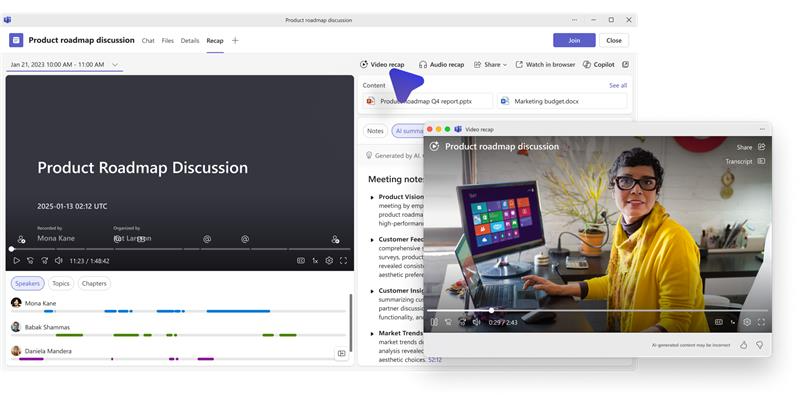
We are introducing video-based meeting recaps in Microsoft Teams to help users quickly catch up on meetings they missed or revisit key moments. Video recap creates narrated video highlights from recorded meetings, combining key takeaways with short video clips that showcase important discussion points.   

Coming late April 2026 and expect to complete by early May 2026. 

***REQUIRES COPILOT LICENSE*** 

blog_msupdates_mar26_1

2. Identify external bots joining your Teams meetings

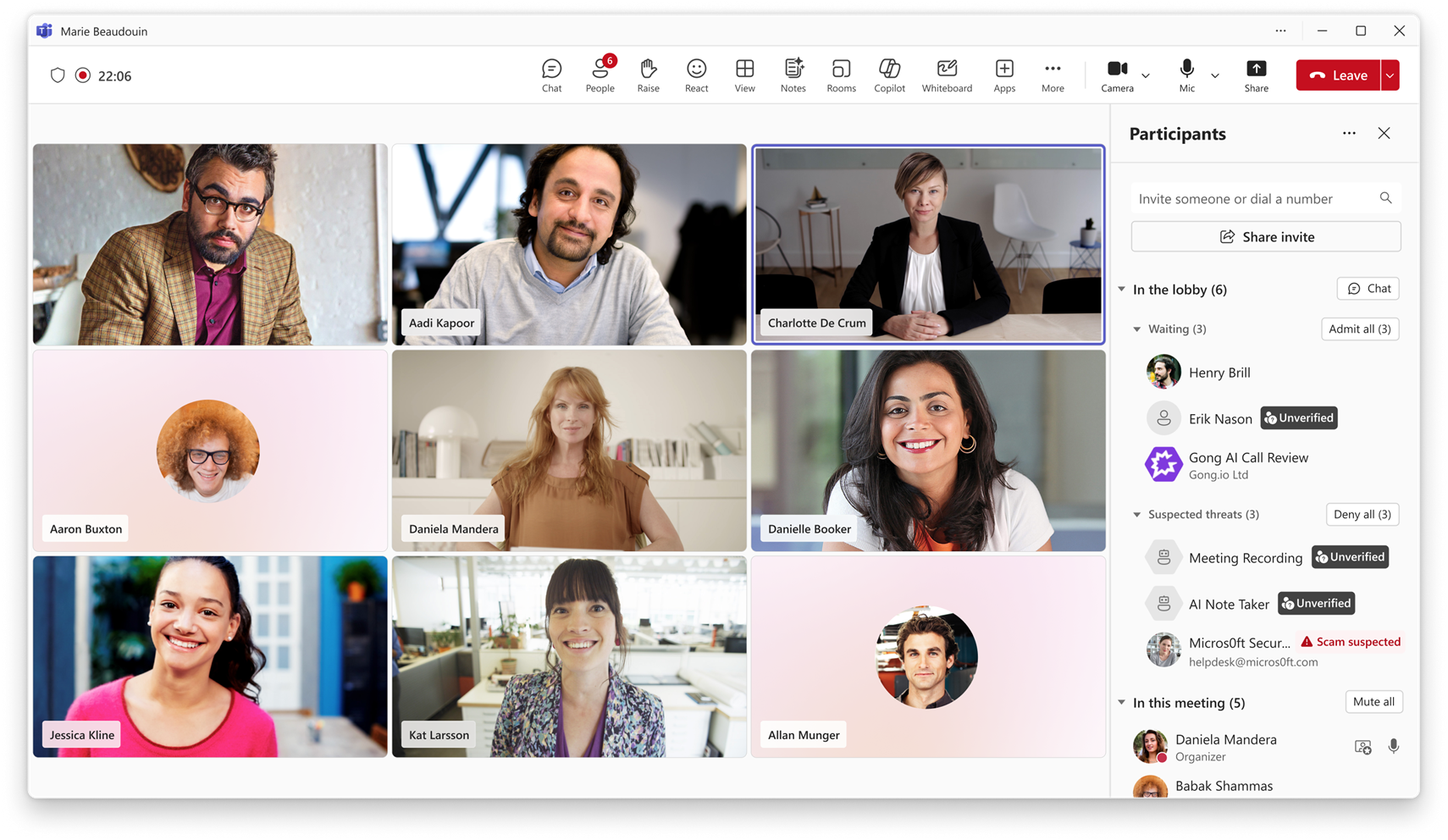
To help organizations protect meeting content and increase visibility into automated participants, Microsoft Teams is introducing a new capability that detects external meeting assistant bots as they attempt to join meetings. This update gives organizers greater awareness and control and provides administrators with clear controls to manage how detected bots are handled in meetings hosted across the organization. 

Coming early June 2026 and expect to complete by mid-June 2026. 

blog_msupdates_mar26_2

3. Manage multiple phone numbers within one Teams account

Teams Phone user multi-line provides greater flexibility for organizations whose users manage multiple business numbers. This capability allows administrators to assign up to 10 telephone numbers to a single Teams Phone user, all within one Teams account. Users can make and receive calls from multiple numbers across Teams desktop, Teams mobile, and Teams devices without switching accounts or hardware. 

Coming late April 2026 and expect to complete by mid-May 2026.


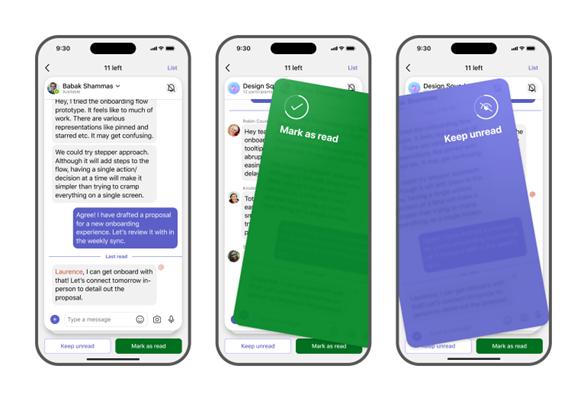
4. Catch up in Teams mobile 

This new, consolidated view helps users triage conversations that need their attention across chats, meeting chats, and followed channels or threads. 

Coming early May 2026; expected completion in early May 2026. 

blog_msupdates_mar26_3


exchange-logo-150x150

Microsoft Outlook


New Features
 
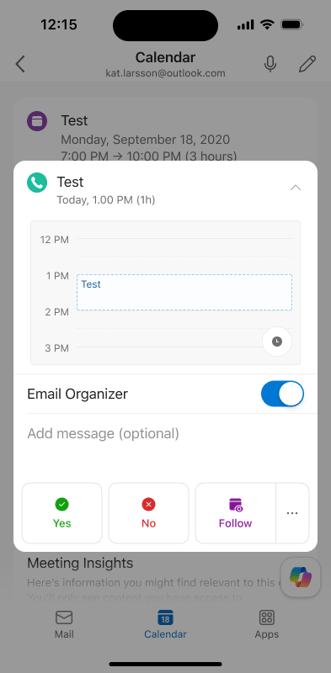
1. Outlook Mobile: Follow a meeting option

This feature helps users stay informed when they cannot attend by prompting organizers to record the meeting and by ensuring followers receive key updates and follow‑up items.  Coming mid-April 2026 (previously mid‑March) and is expected to complete by end of April 2026 (previously mid‑April). 

blog_msupdates_mar26_4


NewOfficelogo

Microsoft 365 Apps


New Features


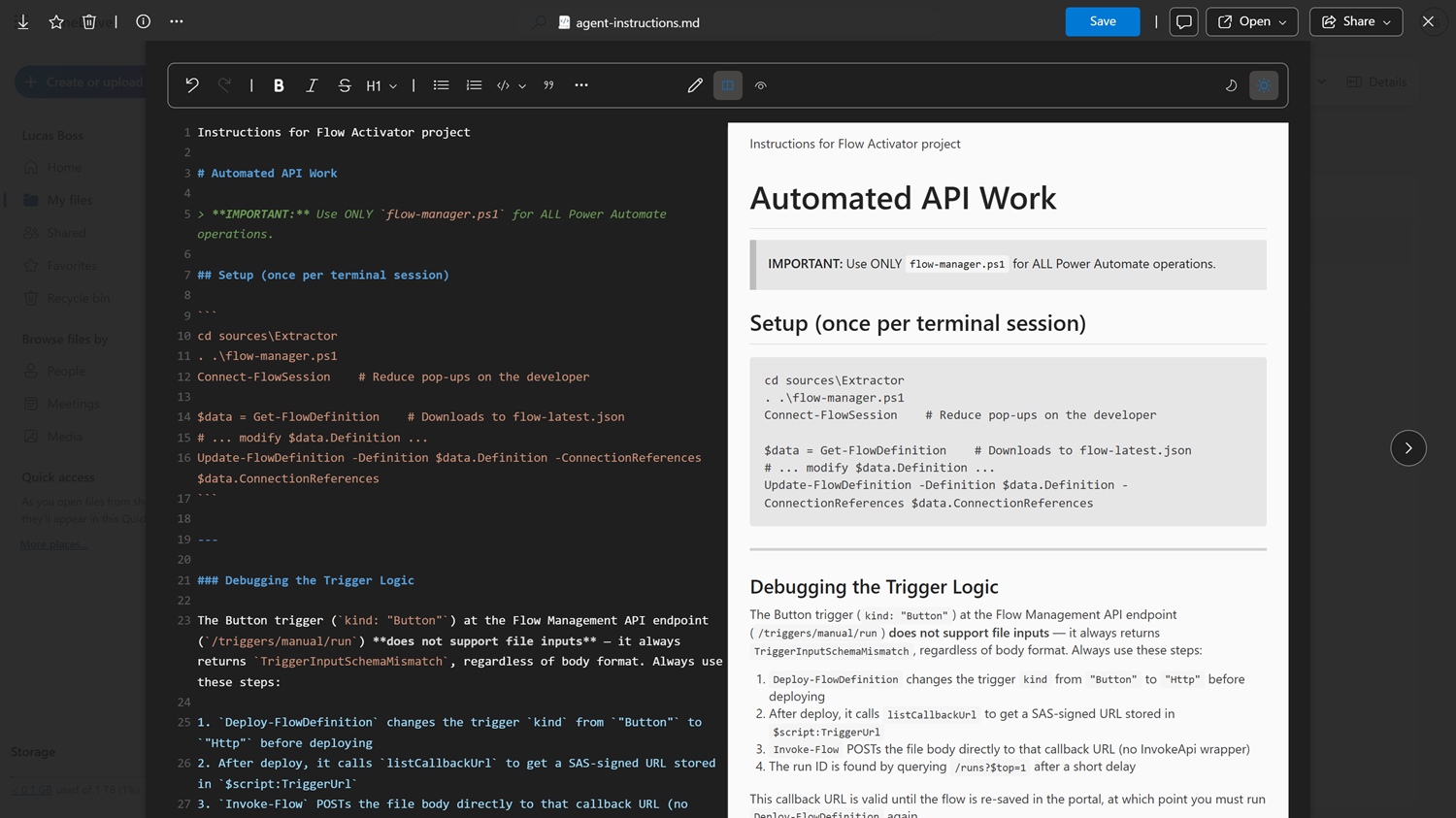
1. View and edit Markdown files in OneDrive and SharePoint

OneDrive and SharePoint now support viewing and editing Markdown (.md) files directly in the browser. No downloads or third-party tools are needed. Coming mid-April 2026 and is expected to complete by late May 2026.   


blog_msupdates_mar26_5
 
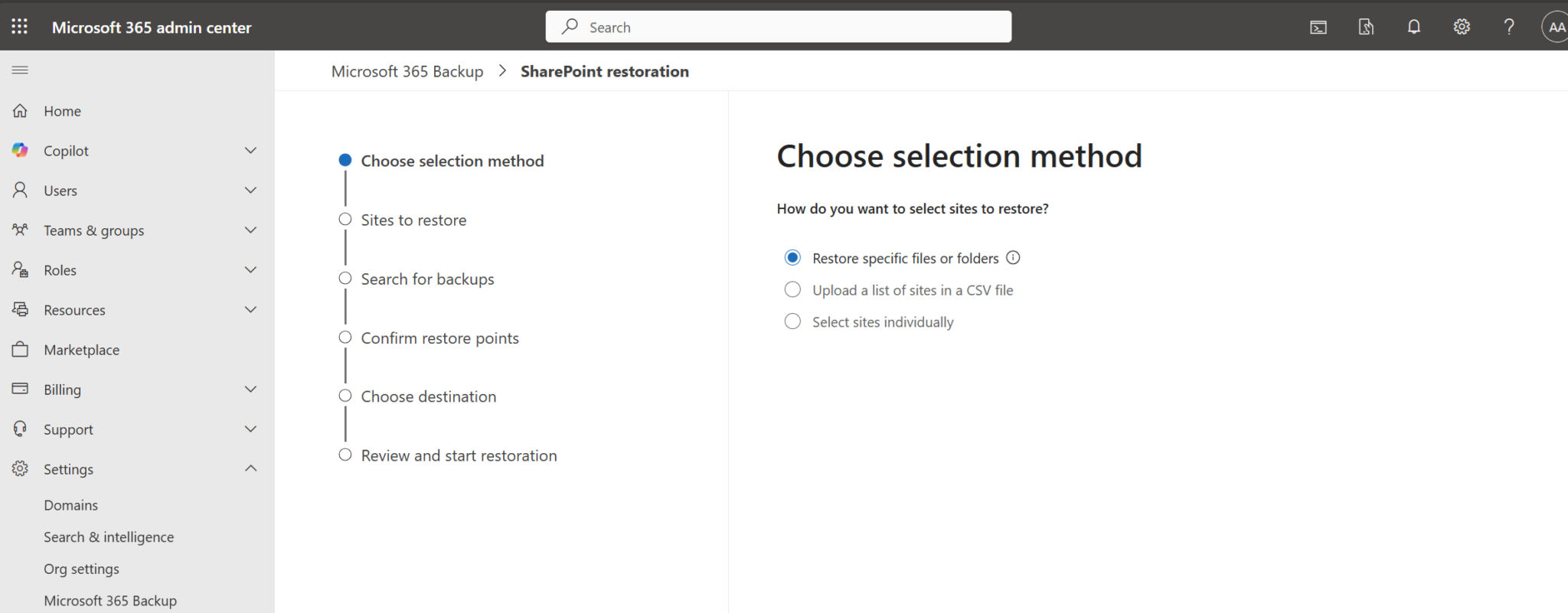
2. Targeted file and folder restores in Microsoft 365 Backup 

Microsoft is introducing granular restore capabilities in Microsoft 365 Backup, allowing administrators to browse, search, and restore individual files or folders from restore points for protected SharePoint sites and OneDrive accounts. Coming late April 2026 and expect to complete by early May 2026. 

blog_msupdates_mar26_6


End Of Life


3. Retirement of SharePoint One-Time Passcode (SPO OTP) and transition to Microsoft Entra B2B 

Retiring SharePoint One‑Time Passcode (SPO OTP) authentication in OneDrive and SharePoint starting July 2026. Beginning in May 2026, new external sharing invitations and authentication will start using Microsoft Entra B2B instead of SPO OTP.

  • May 2026: Invitation and authentication for new external sharing begins transitioning to Microsoft Entra B2B. Users who previously authenticated via SPO OTP will continue to have access to specific people links even without a B2B guest account yet.

  • July 2026: Retirement of SPO OTP authentication begins. External users without a guest account get access denied on previously shared specific people links. To restore access, a guest account must be created in Entra B2B, or an allowed user must share/re-share at least one file/folder/site.

Retirement is expected to complete by August 31, 2026. 


New Features
 
4. Set expiration policies for “People in your organization” sharing links in SharePoint and OneDrive

To help organizations reduce the risk of unintended long-term access to internal content, Microsoft is introducing expiration policies for “People in your organization” sharing links in SharePoint and OneDrive. This update enables administrators to automatically expire these sharing links after a defined period, supporting stronger data governance and minimizing exposure from stale links. 

Coming mid-March 2026 and expect to complete by late June 2026. 

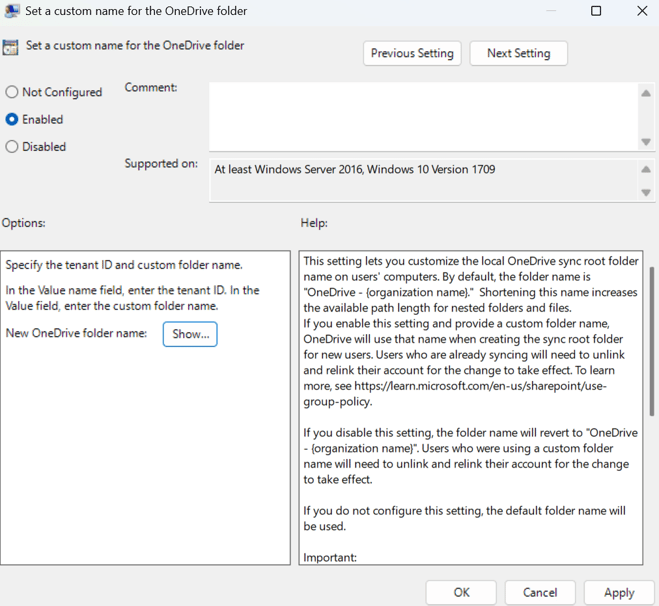
5. Set a custom name for the OneDrive sync folder

To help reduce Windows file path length issues and improve the local file system experience, IT admins can now set a custom name for the local OneDrive sync root folder on users’ Windows devices using the policy Set a custom name for the OneDrive sync folder with the String ID CustomSyncRootFolderName. Today, the default folder name (“OneDrive – (organization name)”) can contribute to path length constraints in deeply nested folder structures.

blog_msupdates_mar26_7

Coming mid-March 2026 and complete on March 18, 2026 (previously early April). 


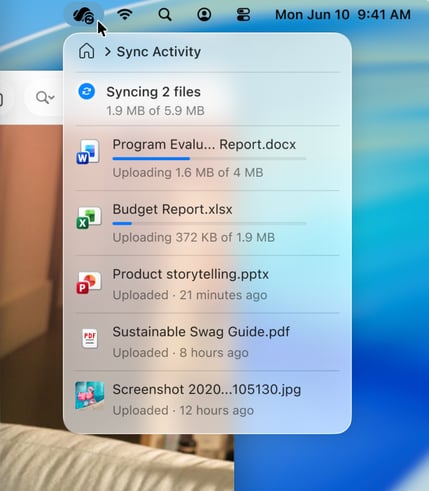
6. Improved OneDrive sync experience for macOS users

Refreshing the OneDrive Activity Center on macOS. This redesign brings a cleaner, more intuitive way to check sync status, manage files, and resolve issues, right from your desktop. Coming early April 2026 and expect to complete by late May 2026. 

blog_msupdates_mar26_8


microsoft-edge-logo-00-150x150

Microsoft Edge


New Features


1. Cross-tenant support using Intune Mobile Application Management (MAM)

This update allows organizations to apply Intune App Protection Policies to Edge work profiles even when the device is managed by another tenant. This capability helps protect corporate data in cross-tenant scenarios such as contractors, partners, or mergers, without requiring additional device enrollment or disrupting the end-user experience. 

Learn More: https://learn.microsoft.com/en-us/deployedge/microsoft-edge-cross-tenant-support-using-intune-mam  

Coming early April 2026 and expect to complete by mid-April 2026. 


NewIntuneLogoMicrosoft Intune


New Features


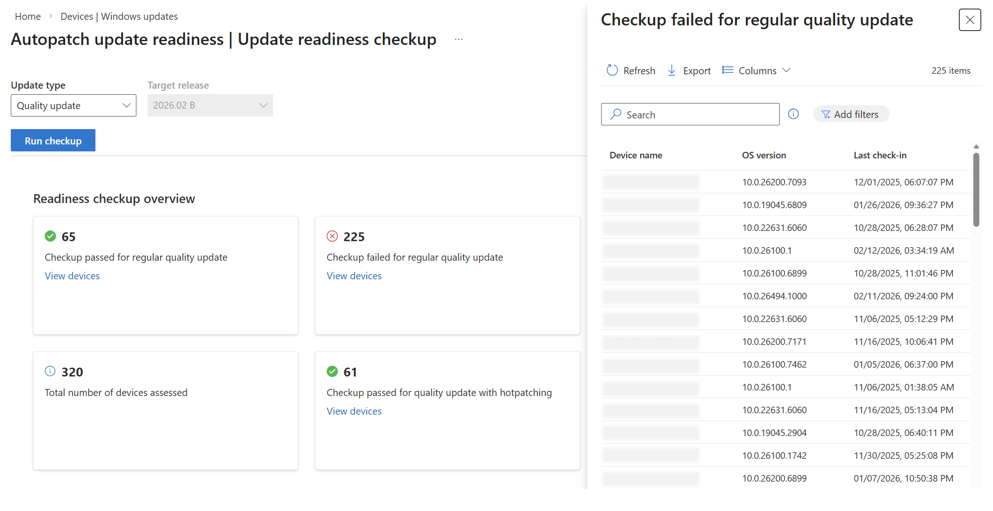
1. Prepare devices for successful updates with Windows Autopatch update readiness

Designed to help IT teams proactively prepare devices for upcoming Windows updates, update readiness surfaces risks and blockers before updates are deployed, reducing failures, downtime, and reactive troubleshooting. 

Learn More:
https://learn.microsoft.com/en-us/windows/deployment/windows-autopatch/monitor/windows-autopatch-update-readiness-overview

blog_msupdates_mar26_9

Capabilities light up within the Windows Autopatch blade in the Microsoft Intune admin portal starting March 2, 2026.

entra_logo

Microsoft Entra


New Features


1. Passkeys in Microsoft registration campaigns

Microsoft Registration Campaigns will support Passkeys (FIDO2) as an additional authentication method, enabling phishing-resistant credentials. Eligible Microsoft 365 tenants can opt users into Passkey registration nudges during sign-in.

Who is affected

  • Microsoft 365 tenants using Microsoft Registration Campaigns

  • Tenants configured in either Microsoft‑managed or Enabled states

  • Users who are MFA‑capable and eligible for Passkeys (FIDO2)

What will happen

Microsoft‑managed state

Your tenant will be impacted when all of the following conditions are met:

  • The Passkeys (FIDO2) authentication method policy is enabled.

  • Allow self‑service setup is enabled.

  • Target specific AAGUIDs is not selected (no AAGUID restrictions configured).

  • The Authentication Methods Registration Campaign state is set to Microsoft‑managed.

When these conditions are met, the following settings will update automatically:

  • The targeted authentication method will change from Microsoft Authenticator to Passkeys (FIDO2).

  • Days allowed to snooze will change from three days to one day. (This setting will no longer be configurable.)

  • Limit number of snoozes will be disabled. (This setting will no longer be configurable.)

  • Targeting will expand to all MFA‑capable users. (This setting will no longer be configurable.)

  • Default user targeting will change from voice call or text message users to all multifactor authentication (MFA)–capable users.

Affected users will receive Passkey registration nudges at sign‑in after completing MFA.

Coming early April 2026 and expect to complete in late May 2026. 


2. Entra Backup and Recovery

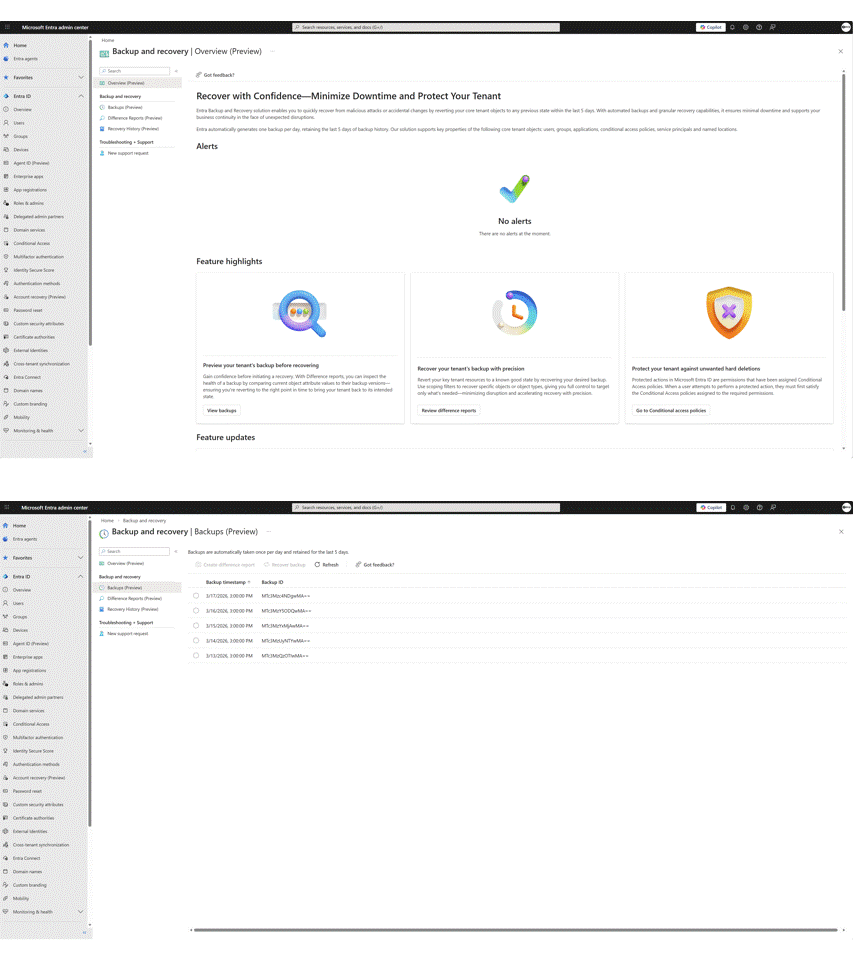
Microsoft Entra Backup and Recovery helps you build identity resilience into daily operations using an always‑on, Microsoft‑managed solution that rapidly restores critical identity objects to a known‑good state. It provides automatic backups, point‑in‑time visibility into configuration changes, and backups are protected by a built‑in safeguard that prevents them from being disabled, deleted, or altered. This helps reduce recovery time and maintain business continuity.

For Public Preview, we are announcing new capabilities that help you recover with confidence: Restoring core directory objects 1 backup a day within the last 5 days, including users, groups, applications, service principals, Conditional Access policies, authentication method policy, authorization policy, and named locations. 

blog_msupdates_mar26_10

In public preview now. Learn more:  https://techcommunity.microsoft.com/blog/microsoft-entra-blog/strengthen-identity-resilience-recover-with-confidence-using-microsoft-entra-bac/4462426


3. Microsoft Entra Tenant Governance

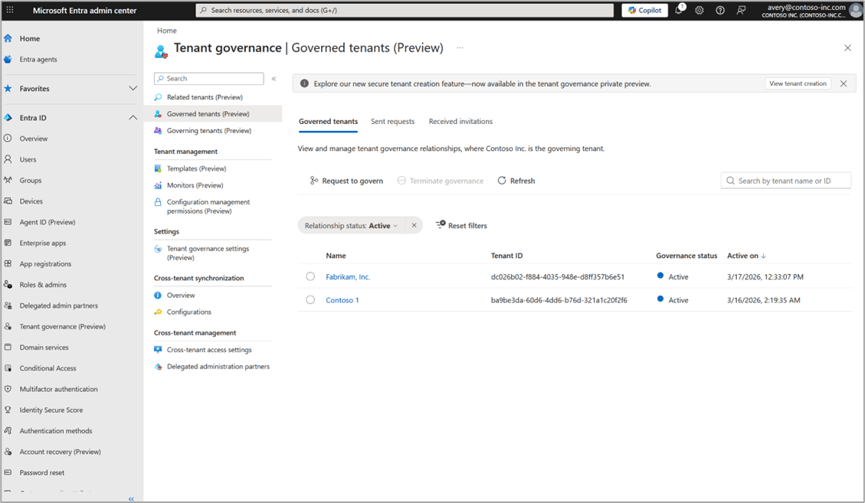
Mergers, acquisitions, and the rise of shadow IT often lead to a fragmented tenant landscape. Microsoft Entra Tenant Governance addresses this challenge by providing a centralized, risk-informed way to discover, govern, and continuously secure all related tenants. 

In public preview now. Learn more: https://techcommunity.microsoft.com/blog/microsoft-entra-blog/microsoft-entra-tenant-governance-secure-and-manage-multi-tenant-environments-at/4462427  

blog_msupdates_mar26_11


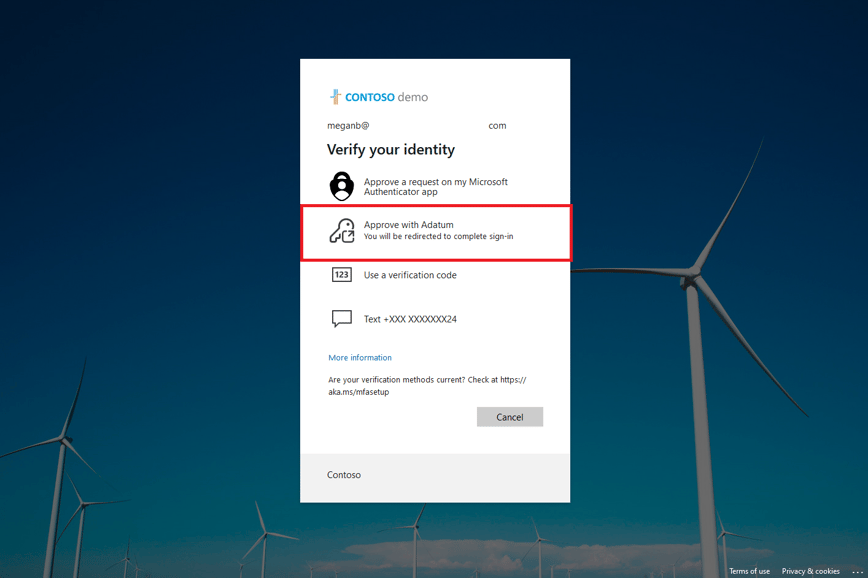
4. External MFA in Microsoft Entra ID is now Generally Available

Now, with the GA of external multifactor authentication (external MFA)—previously known as external authentication methods—you can integrate trusted third-party MFA providers while continuing to rely on Microsoft Entra ID as your central identity control plane. 

blog_msupdates_mar26_12

GA, External MFA replaces Custom Controls, which will be deprecated on September 30, 2026

Learn more: https://techcommunity.microsoft.com/blog/microsoft-entra-blog/external-mfa-in-microsoft-entra-id-is-now-generally-available/4488926  


purview-icon-150x150

Microsoft Purview


New Features


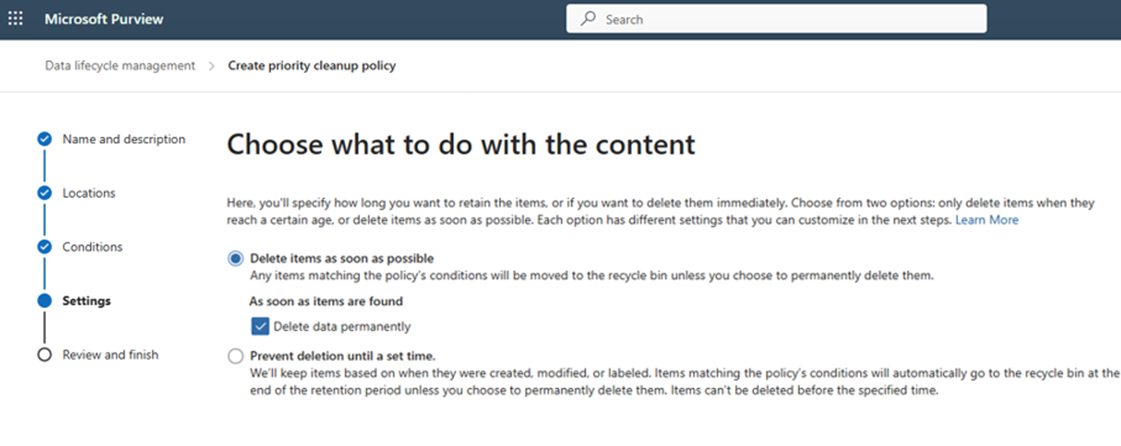
1. Data Lifecycle Management – Hard delete OneDrive and SharePoint files with priority cleanup workflow 

Allows administrators to permanently delete (hard delete) specific OneDrive and SharePoint content types, even when retention policies or holds are in place. Coming ate May 2026 and is expected to complete by mid-June 2026. 

blog_msupdates_mar26_13

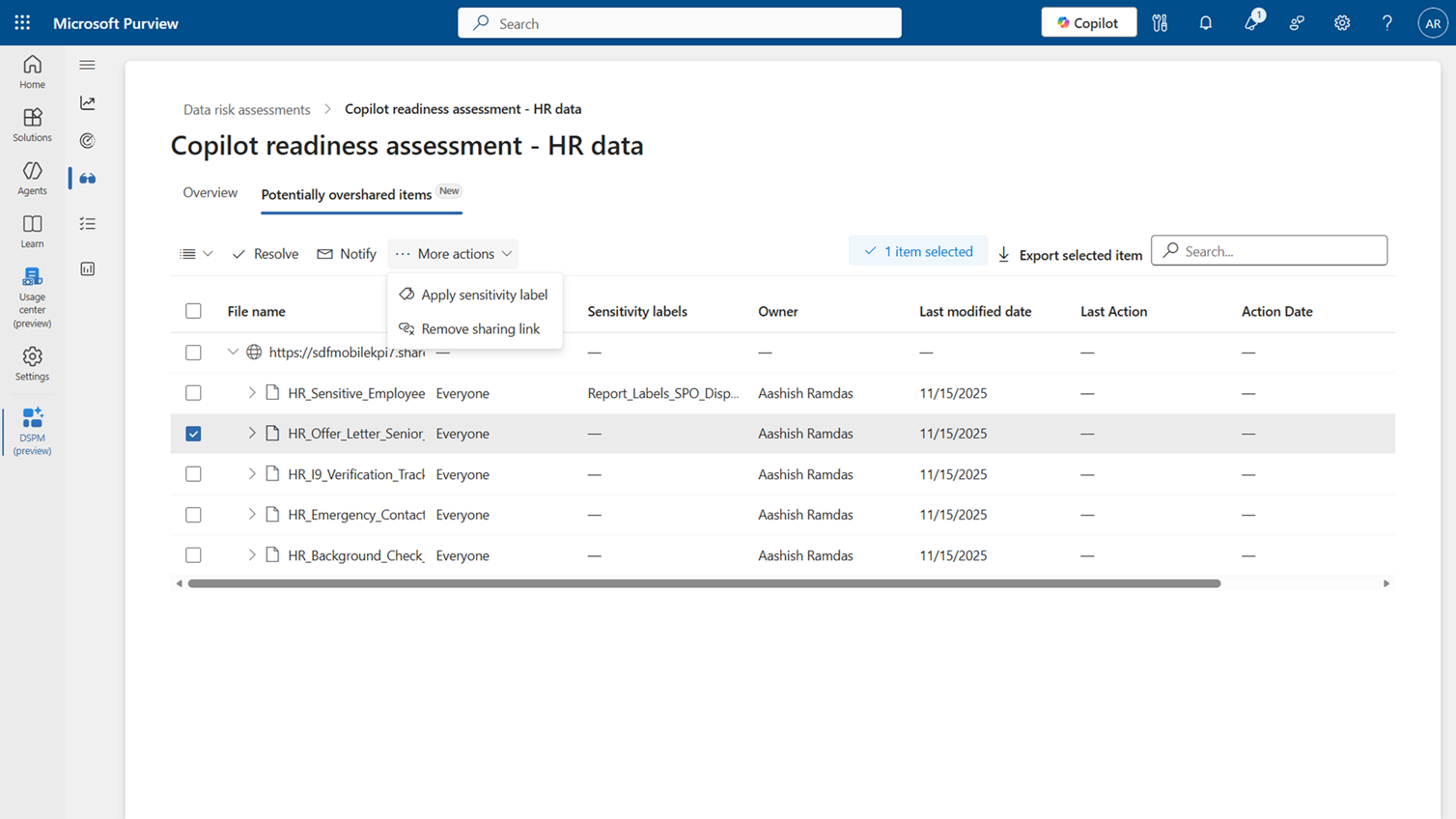
2. DSPM’s Data Risk Assessments now support item-level investigation and remediation of SharePoint

New item-level insights such as sensitivity label status and sharing link details make it easier to pinpoint overshared content. Admins can take direct remediation actions on selected items, including resolving findings, notifying owners, applying sensitivity labels, or removing sharing links. (Requires E5 or Purview Suite Add-On).

Coming early March 2026 and expect to complete by mid-March 2026. 

blog_msupdates_mar26_14

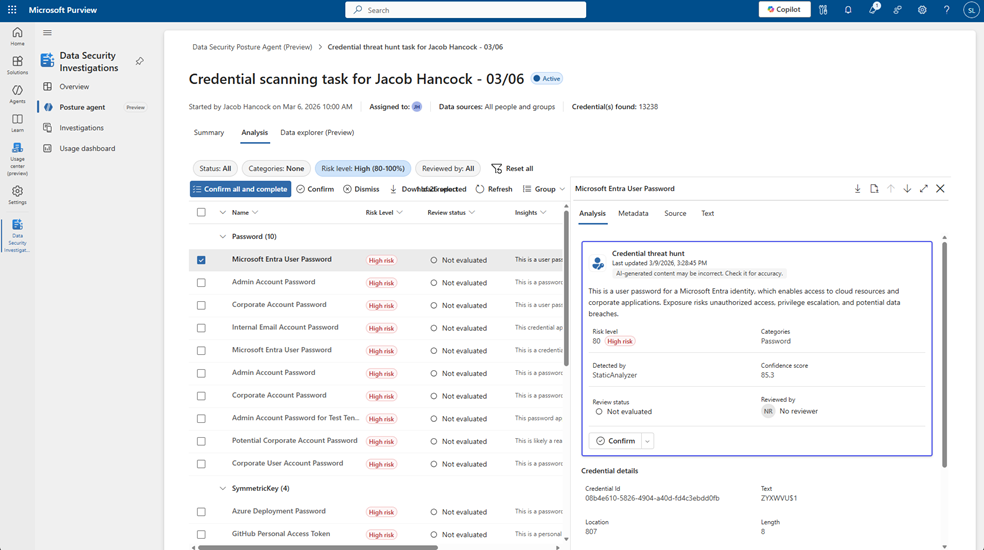
3. Credential scanning in Data Security Posture Agent 

We are expanding the Data Security Posture Agent in Microsoft Purview with a new credential scanning capability. This update helps your organization discover exposed credentials and related data security risks across scoped locations.

The agent analyzes selected data locations to detect sensitive credential types—including Microsoft Entra user credentials, private keys, and API tokens—and provides risk scores, AI-generated insights, confidence ratings, and credential categories so you can review, confirm, and take action from a single task board view.  (Requires Agent Add-On).

Coming late June 2026 and complete by early July 2026. 

blog_msupdates_mar26_15

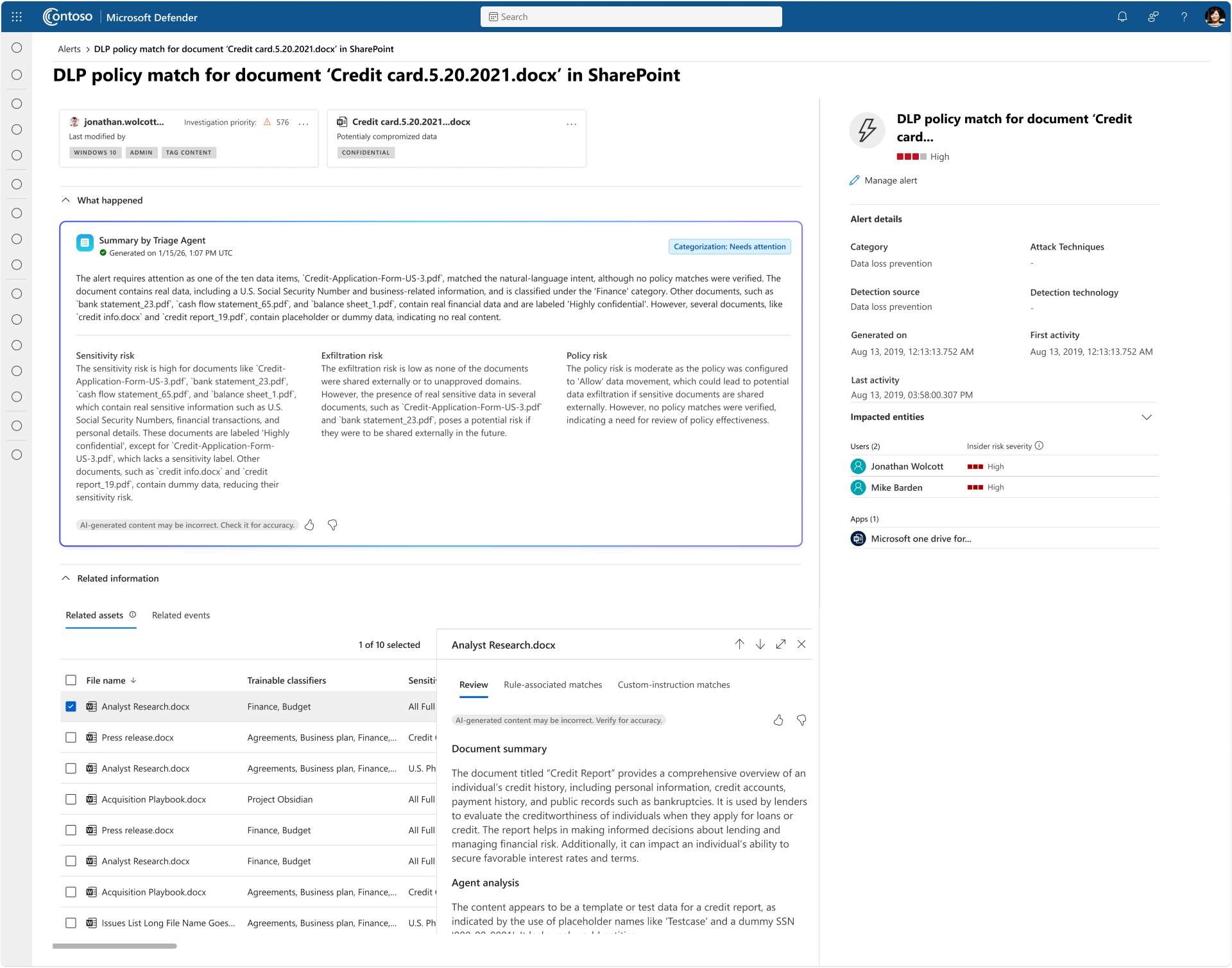
4. Data Security Triage Agent Summaries for DLP Alerts in Microsoft Defender XDR

This update helps security analysts triage DLP alerts more efficiently by surfacing AI-generated summaries and categorizations created by the Microsoft Purview Data Security Triage Agent. Coming mid-August 2026 and expect to complete by late August 2026. 

blog_msupdates_mar26_16

m365_icon_copilot_180x180

Microsoft Copilot


New Features


1. Copilot Cowork

Cowork makes it easy to delegate work. Describe the outcome you want and Cowork automatically grounds the work in your emails, meetings, messages, files, and data. Powered by Work IQ, Cowork draws on signals across Outlook, Teams, Excel, and the rest of Microsoft 365 so it can act with the same understanding you bring to your job. Coming late March 2026.

Learn More: Copilot Cowork: A new way of getting work done | Microsoft 365 Blog

All Wave 3 Announcements: https://techcommunity.microsoft.com/blog/microsoft365copilotblog/in-case-you-missed-it-frontier-transformation-and-wave-3-of-microsoft-365-copilo/4504765  


2. Introducing Federated Copilot Connectors 

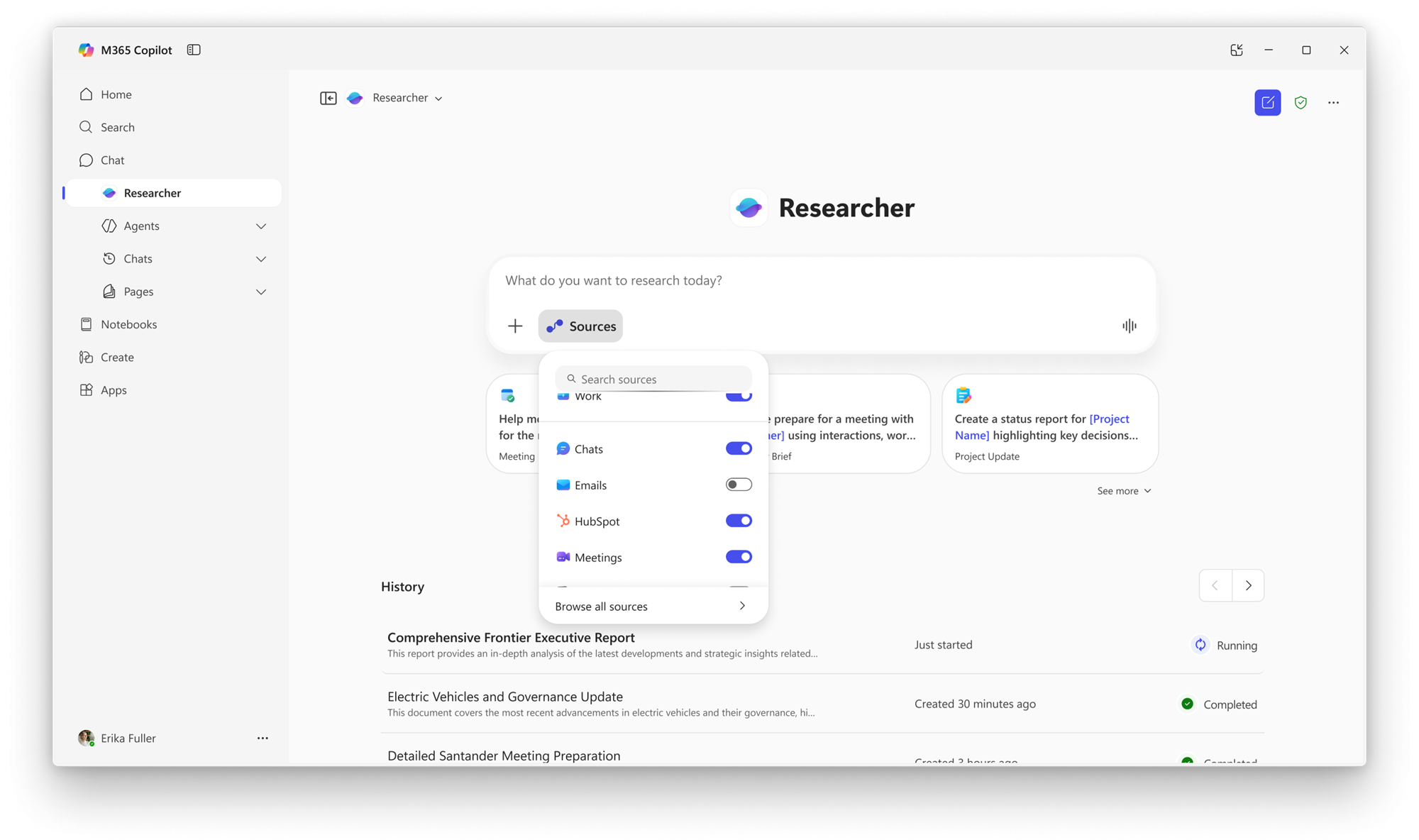
Federated Copilot connectors enable users to securely connect Copilot to popular third‑party sources and retrieve data in real time using the Model Context Protocol (MCP).

These connectors do not store or index customer data in Microsoft services; access occurs in real time using the user’s identity, while administrators retain full governance and control through the Microsoft 365 admin center.

Coming late April 2026 and complete by late May 2026.

Microsoft‑published federated Copilot connectors available at GA include:

  • Canva

  • HubSpot

  • Linear

  • Intercom

  • Google Calendar

  • Google Contacts

  • Notion

  • S&P Global

  • Moody’s

  • LSEG 

blog_msupdates_mar26_173. Copilot Notebooks: New features coming to Frontier Public
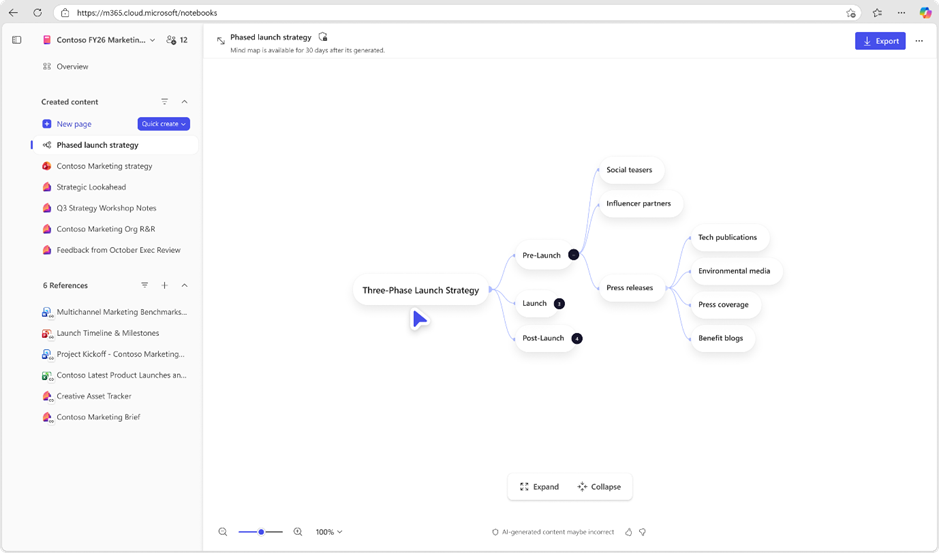
Several new Copilot Notebooks features to the Frontier Public environment to help users learn faster, create content more efficiently, and collaborate more easily within their organization. Coming early April 2026 through early May 2026.  

Full Breakdown: https://techcommunity.microsoft.com/blog/microsoft365copilotblog/copilot-notebooks-enhancements-to-support-creation-collaboration-and-learning/4505360  

blog_msupdates_mar26_18


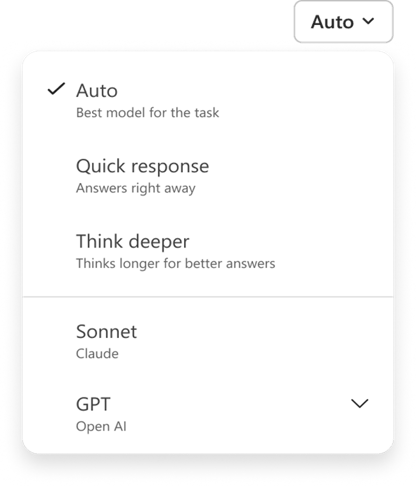
4. Anthropic Claude Sonnet is now available in Microsoft 365 Copilot

Claude Sonnet is available in Copilot Chat in Frontier, alongside the latest OpenAI models, giving users the flexibility to choose the model best suited for their tasks. Rolling out gradually; expected completion late March 2026. 

blog_msupdates_mar26_19

Admin-logo-2-150x150

Microsoft Admin


New Features


1. Introducing Microsoft 365 E7

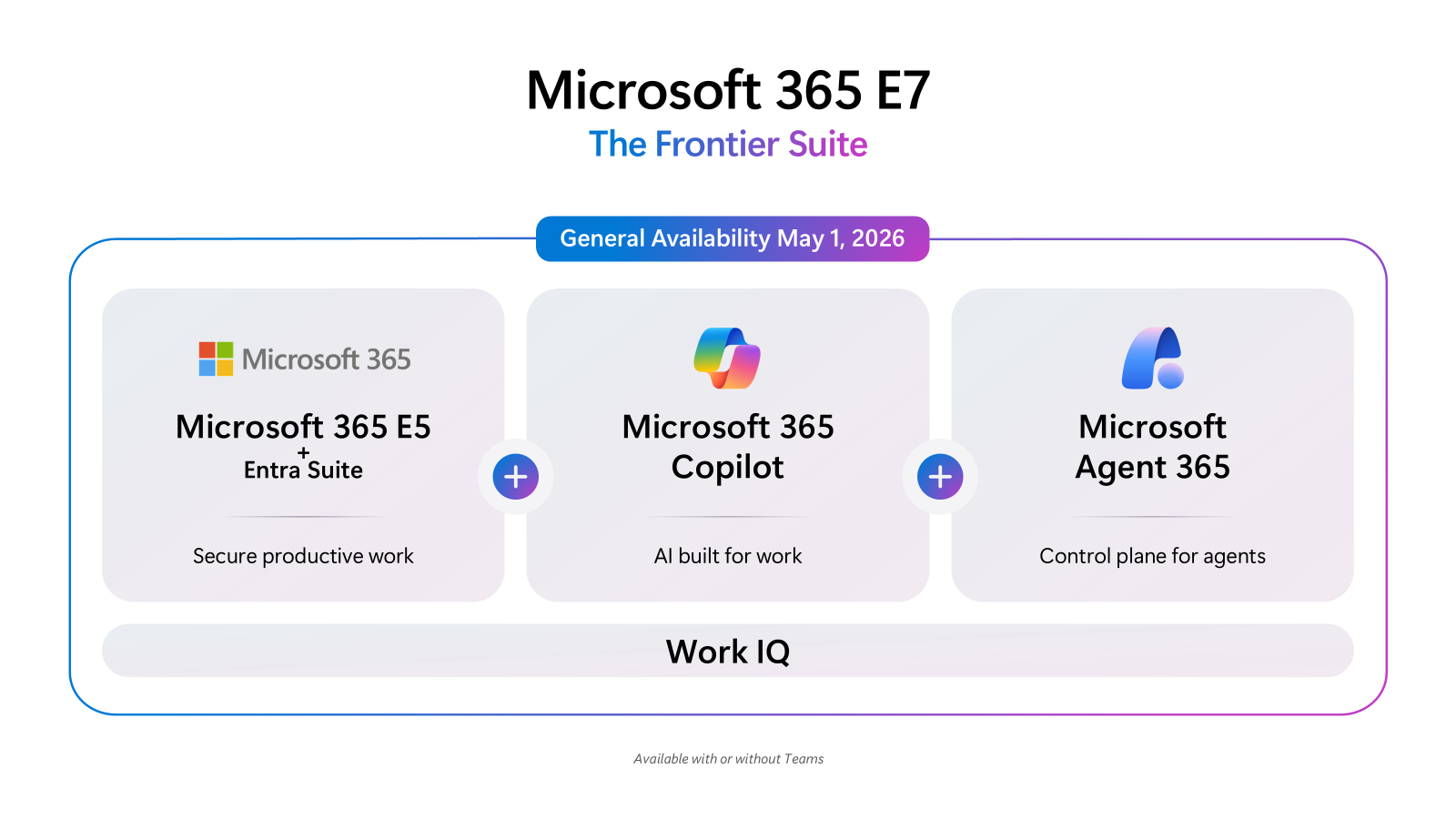
Built to help customers seize the agentic moment and drive frontier transformation, Microsoft 365 E7 and Microsoft Agent 365 will be generally available as of May 1, 2026. 

Learn More: March 2026 announcements – Partner Center announcements | Microsoft Learn 

blog_msupdates_mar26_20


What’s New in Microsoft 365 | March 2026 Updates

16 min read

What’s New in Microsoft 365 | March 2026 Updates

Microsoft released quite a few high-impact updates this past month, and Nick gives you the streamlined summary to capture just what you...

Read More
Microsoft Is Killing the Free Grace Period

8 min read

Microsoft Is Killing the Free Grace Period

Big changes are coming to how Microsoft handles subscription renewals in the CSP program. If you’re an MSP, this affects you and every...

Read More
How to Use Exact Data Match (EDM) to Eliminate DLP False Positives in Microsoft 365

8 min read

How to Use Exact Data Match (EDM) to Eliminate DLP False Positives in Microsoft 365

If you’ve ever set up a DLP policy in Microsoft 365, you’ve probably experienced the false positive problem. You create a rule to catch...

Read More